
NSE4 · Question #126
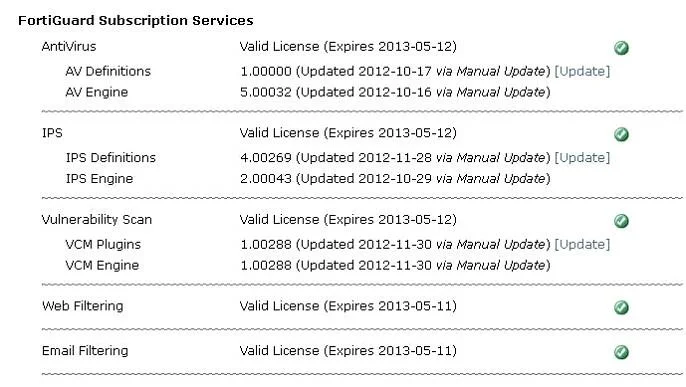
Examine the exhibit shown below; then answer the question following it. Which of the following statements best describes the green status indicators that appear next to the different FortiGuard…
The correct answer is A. They indicate that the FortiGate unit is able to connect to the FortiGuard Distribution Network. Green status indicators for FortiGuard services on a FortiGate unit confirm that the FortiGate can successfully connect to the FortiGuard Distribution Network.
Question
Examine the exhibit shown below; then answer the question following it. Which of the following statements best describes the green status indicators that appear next to the different FortiGuard Distribution Network services as illustrated in the exhibit?
Exhibit
Options
- AThey indicate that the FortiGate unit is able to connect to the FortiGuard Distribution Network.
- BThey indicate that the FortiGate unit has the latest updates that are available from the FortiGuard
- CThey indicate that updates are available and should be downloaded from the FortiGuard
- DThey indicate that the FortiGate unit is in the process of downloading updates from the FortiGuard
How the community answered
(51 responses)- A92% (47)
- B2% (1)
- C4% (2)
- D2% (1)
Why each option
Green status indicators for FortiGuard services on a FortiGate unit confirm that the FortiGate can successfully connect to the FortiGuard Distribution Network.
Green status indicators next to FortiGuard Distribution Network services on a FortiGate unit primarily confirm that the FortiGate can successfully establish and maintain a connection to the FortiGuard servers for those services, allowing it to request and receive updates or perform lookups.
While connectivity is necessary for updates, a green status indicator only confirms a *connection* and does not necessarily guarantee that the FortiGate has the absolute latest definition versions installed.
A green indicator signifies a successful connection but does not specifically denote that new updates are currently available or that they are awaiting download from the FortiGuard Distribution Network.
The green status indicator denotes a successful connection status and service availability; it does not specifically signify that an update download is actively in progress.
Concept tested: FortiGuard service connection status indicators
Source: https://docs.fortinet.com/document/fortigate/7.4.0/administration-guide/321909/fortiguard-service-status
Topics
Community Discussion
No community discussion yet for this question.