
Palo_Alto_Networks
NETSEC-ANALYST · Question #377
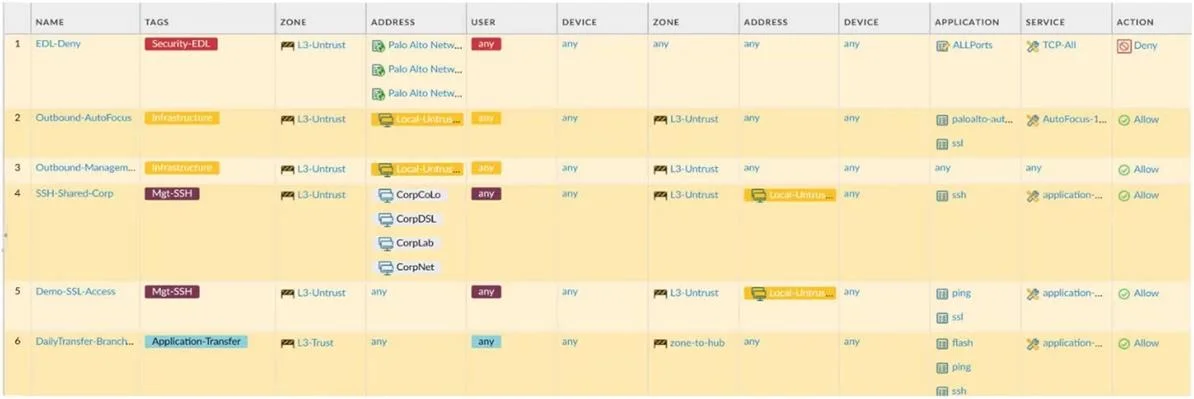
An administrator is reviewing the Security policy rules shown in the screenshot. Why are the two fields in the Security policy EDL-Deny highlighted in red?
Sign in or unlock NETSEC-ANALYST to reveal the answer and full explanation for question #377. The question stem and answer options stay visible for context.
Security Policy Configuration
Question
An administrator is reviewing the Security policy rules shown in the screenshot. Why are the two fields in the Security policy EDL-Deny highlighted in red?
Exhibit
Options
- ABecause antivirus inspection is enabled for this policy
- BBecause the destination zone, address, and device are all "any"
- CBecause the action is Deny
- DBecause the Security-EDL tag has been assigned the red color
Unlock NETSEC-ANALYST to see the answer
You've previewed enough free NETSEC-ANALYST questions. Unlock NETSEC-ANALYST for full answers, explanations, the timed quiz mode, progress tracking, and the master PDF. Question stem and options stay visible so you can still see what's on the exam.
Topics
#security policy tags#EDL#policy visual indicators#tag color assignment