
NCP-MCI-6.10 · Question #77
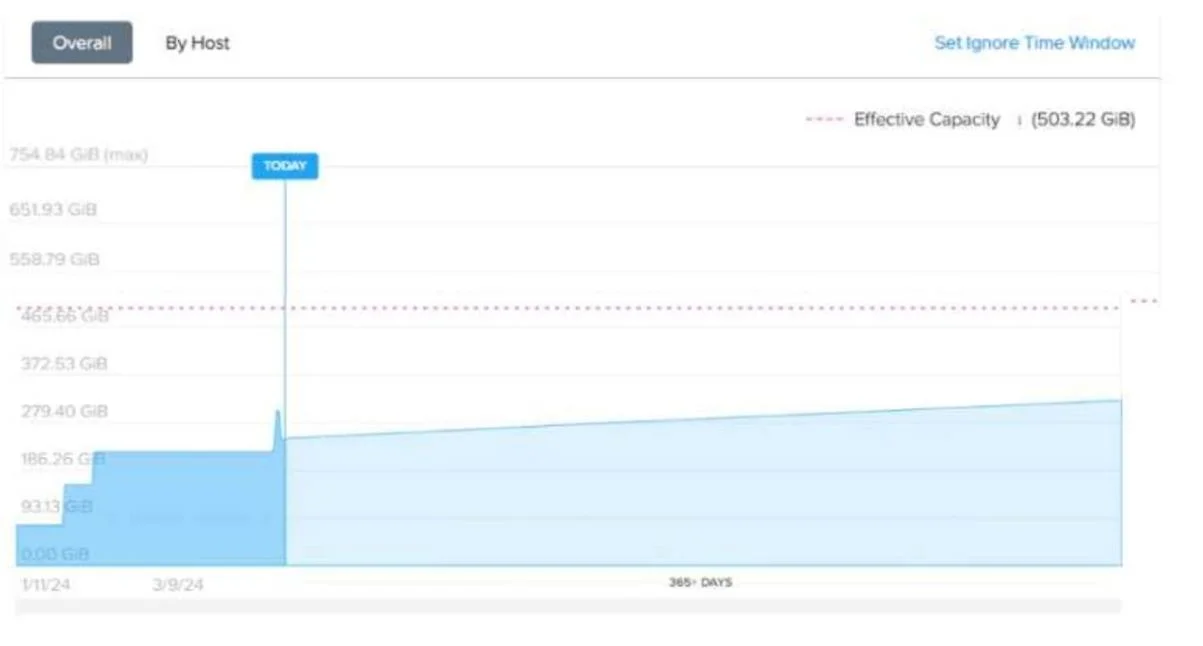
Refer to Exhibit. An administrator is looking at the memory cluster runway diagram as shown in exhibit, in Prism Central. The environment has three hosts with the following configuration: CPU: 2x…
The correct answer is D. It is the usable capacity based on cluster configuration options. In the Nutanix Prism Central runway (capacity planning) diagram, the dotted red line represents the usable capacity ceiling derived from the cluster's configuration options - such as the configured resiliency factor (RF2/RF3), reserved capacity for failures, and redundancy…
Question
Refer to Exhibit. An administrator is looking at the memory cluster runway diagram as shown in exhibit, in Prism Central. The environment has three hosts with the following configuration:
CPU: 2x Intel Xeon Gold (8 cores, 2.6 GHz) RAM: 256 GB per host Storage: SSDs and HDDs The Intelligent Operations feature has been active for one month, but no further configurations were applied. What does the dotted red line mean?
Exhibit
Options
- AIt is the default trend analysis static threshold that can be manually set.
- BIt is the maximum memory the administrator can assign to VMs.
- CIt is the calculated memory oversubscription limit for currently running VMs.
- DIt is the usable capacity based on cluster configuration options.
How the community answered
(15 responses)- B7% (1)
- D93% (14)
Explanation
In the Nutanix Prism Central runway (capacity planning) diagram, the dotted red line represents the usable capacity ceiling derived from the cluster's configuration options - such as the configured resiliency factor (RF2/RF3), reserved capacity for failures, and redundancy settings. This line is dynamically calculated based on how the cluster is configured, not a manually set threshold (eliminating A), not the total memory assignable to VMs (eliminating B), and not the oversubscription limit (eliminating C). It visually marks the effective usable boundary given the current configuration, helping administrators understand how much headroom remains before hitting a configuration-imposed limit.
Topics
Community Discussion
No community discussion yet for this question.