
NCP-MCI-6.10 · Question #60
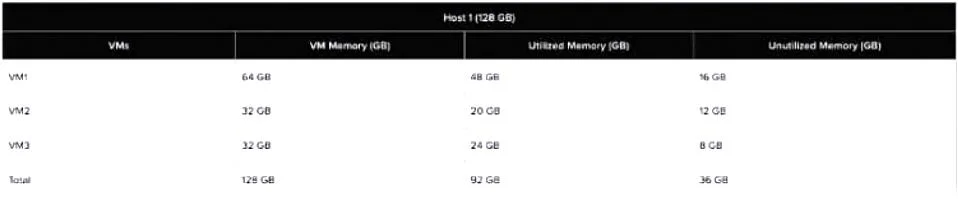
Refer to the Exhibit. An administrator needs to create two virtual machines: VM4 and VM5 that leverage the memory over-commit feature. Once VM4 is created and running, the administrator notices that…
The correct answer is B. 8GB. Understanding the Exhibit & Memory Allocation The host has 128GB of physical RAM. The current memory allocation across three VMs (VM1, VM2, VM3) is 128GB, but only 92GB is actually utilized. This means there is 36GB of unutilized memory available for allocation. Step-by-Step…
Question
Refer to the Exhibit. An administrator needs to create two virtual machines: VM4 and VM5 that leverage the memory over-commit feature. Once VM4 is created and running, the administrator notices that it uses only 28GB of RAM. What will be the maximum RAM that can be allocated to VM5 so that it can be powered on?
Exhibit
Options
- A4GB
- B8GB
- C16GB
- D32GB
How the community answered
(40 responses)- A13% (5)
- B75% (30)
- C8% (3)
- D5% (2)
Explanation
Understanding the Exhibit & Memory Allocation The host has 128GB of physical RAM. The current memory allocation across three VMs (VM1, VM2, VM3) is 128GB, but only 92GB is actually utilized. This means there is 36GB of unutilized memory available for allocation. Step-by-Step Breakdown Existing Memory Usage Before Adding VM4 Total Physical RAM: 128GB Used by running VMs (VM1, VM2, VM3): 92GB Unutilized Memory Available: 36GB After Creating and Running VM4 VM4 is allocated memory but only utilizes 28GB. The table does not show VM4's allocated RAM, but assuming it was given a reasonable allocation, it must have been taken from the 36GB unutilized memory pool. If VM4 uses 28GB, the remaining unutilized memory is now (36GB - 28GB) = 8GB. Maximum Memory Allocation for VM5 Since only 8GB remains unutilized, the maximum memory VM5 can be allocated while still allowing it to power on is 8GB.
Topics
Community Discussion
No community discussion yet for this question.