
NCP-MCI-6.10 · Question #23
Refer to Exhibit. An administrator sees the alert shown in the exhibit. What should the administrator do to ensure the nutanix user can no longer SSH to a CVM using a password?
The correct answer is C. Enable Cluster Lockdown. Cluster Lockdown is the Nutanix security feature that disables password-based SSH authentication on CVMs and requires key-based authentication instead. When enabled, it prevents any user-including the built-in 'nutanix' user-from logging into a CVM via SSH using a password…
Question
Refer to Exhibit. An administrator sees the alert shown in the exhibit. What should the administrator do to ensure the nutanix user can no longer SSH to a CVM using a password?
Exhibit
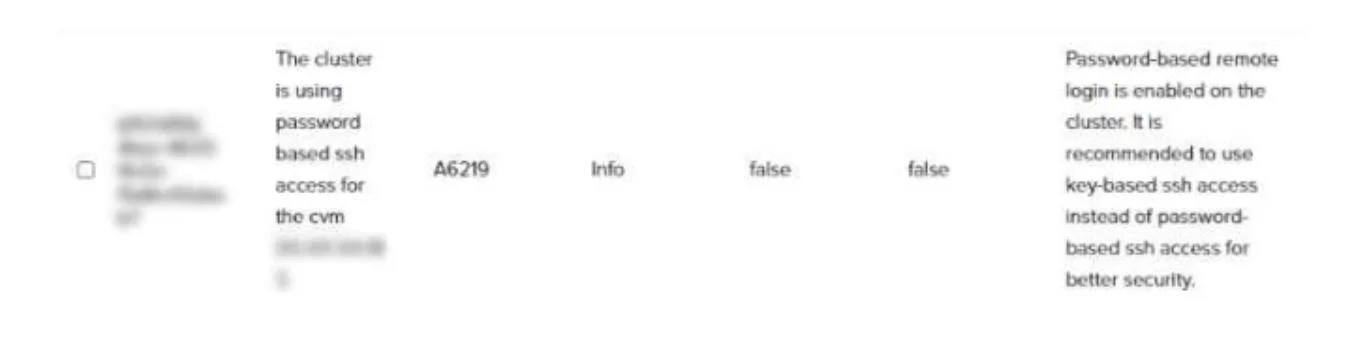
Options
- ARename the nutanix user.
- BBlock port 22 on the CVM firewall.
- CEnable Cluster Lockdown.
- DDelete the nutanix user.
How the community answered
(26 responses)- A4% (1)
- B8% (2)
- C85% (22)
- D4% (1)
Explanation
Cluster Lockdown is the Nutanix security feature that disables password-based SSH authentication on CVMs and requires key-based authentication instead. When enabled, it prevents any user-including the built-in 'nutanix' user-from logging into a CVM via SSH using a password. Renaming or deleting the nutanix user (A, D) would break internal cluster operations that depend on that account. Blocking port 22 entirely (B) would also prevent legitimate key-based SSH access needed for administration. Cluster Lockdown is the purpose-built, least-disruptive solution for this security requirement.
Topics
Community Discussion
No community discussion yet for this question.