
NCP-EUC · Question #9
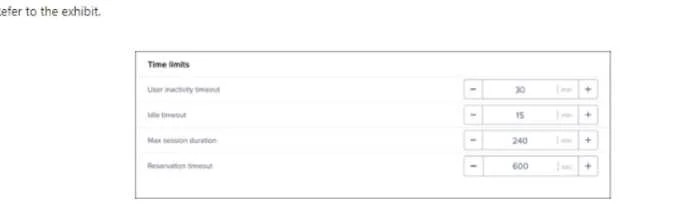
Refer to the exhibit. An administrator was made aware that user sessions are being randomly disconnected. and their applications and files being terminated. When the user launches new virtual…
The correct answer is A. Max session duration. The symptom - users being abruptly disconnected and greeted with a brand-new desktop rather than their previous session - points to a session being forcibly terminated rather than merely timing out due to inactivity. The 'Max Session Duration' setting defines an absolute time…
Question
Refer to the exhibit. An administrator was made aware that user sessions are being randomly disconnected. and their applications and files being terminated. When the user launches new virtual desktop session, they are authenticated to a fresh desktop. upon investigating. the administrator discovers that most users log in at 9:00 AM and are active through 2:00 PM. What configuration setting must be modified in order to resolve this issue?
Exhibit
Options
- AMax session duration
- BIdle timeout
- CReservation timeout
- Duser inactivity timeout
How the community answered
(34 responses)- A74% (25)
- B6% (2)
- C3% (1)
- D18% (6)
Explanation
The symptom - users being abruptly disconnected and greeted with a brand-new desktop rather than their previous session - points to a session being forcibly terminated rather than merely timing out due to inactivity. The 'Max Session Duration' setting defines an absolute time limit for how long any session can remain active, regardless of user activity. If this value is set too low (e.g., 5 hours), users who log in at 9:00 AM will be cut off around 2:00 PM, which aligns perfectly with the observed pattern. 'Idle Timeout' and 'User Inactivity Timeout' would only disconnect inactive users, and 'Reservation Timeout' controls how long an unclaimed desktop reservation is held. Increasing Max Session Duration (Answer A) resolves the forced termination.
Topics
Community Discussion
No community discussion yet for this question.