
NCP-EUC · Question #82
An administrator is trying to add a Nutanix cluster as a new connection, but connection name Nutanix AHV is not listed in the Connection type menu. What should the administrator do to resolve this…
The correct answer is B. Install the Nutanix AHV plugin for Citrix controllers. The 'Connection type' menu in Citrix Studio is populated by hypervisor plugins installed on the Delivery Controllers. When 'Nutanix AHV' does not appear as an option, it means the Nutanix AHV Plugin for Citrix has not been installed on the Delivery Controllers. Installing the…
Question
An administrator is trying to add a Nutanix cluster as a new connection, but connection name Nutanix AHV is not listed in the Connection type menu. What should the administrator do to resolve this issue?
Exhibit
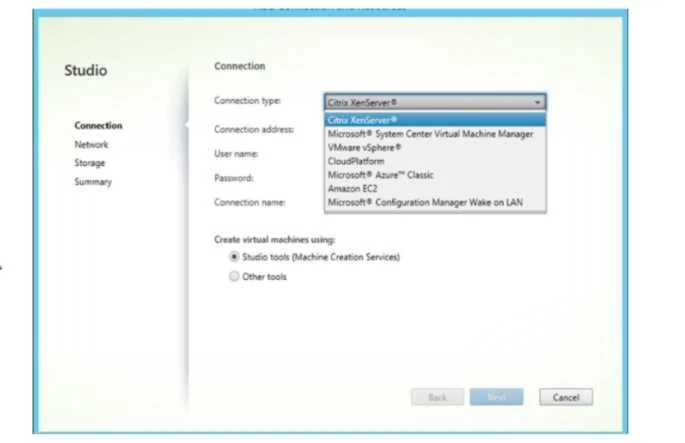
Options
- AInstall the Nutanix AHV plugin for Citrix on all Storefront.
- BInstall the Nutanix AHV plugin for Citrix controllers.
- CInstall the Nutanix AHV plugin for Citrix Director on Delivery controllers.
- DInstall the Nutanix AHV plugin for Citrix Director on Storefront Servers.
How the community answered
(27 responses)- A4% (1)
- B85% (23)
- C4% (1)
- D7% (2)
Explanation
The 'Connection type' menu in Citrix Studio is populated by hypervisor plugins installed on the Delivery Controllers. When 'Nutanix AHV' does not appear as an option, it means the Nutanix AHV Plugin for Citrix has not been installed on the Delivery Controllers. Installing the plugin on Delivery Controllers registers the new connection type with Citrix Studio. Installing it on StoreFront servers (Options A and D) has no effect on the connection type menu, and Citrix Director (Option C) is a monitoring tool and is not involved in defining hypervisor connections.
Topics
Community Discussion
No community discussion yet for this question.