
NCP-EUC · Question #66
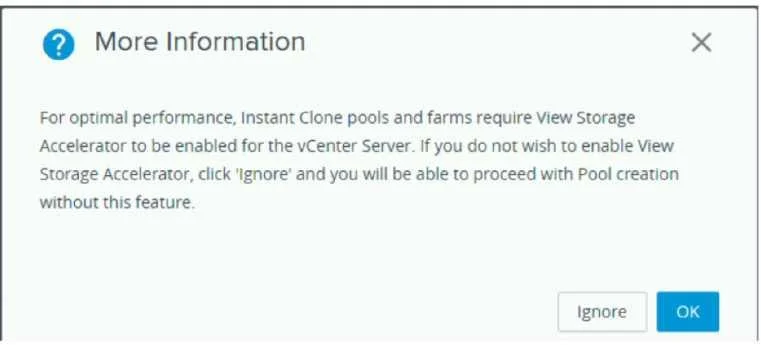
Refer to the exhibit. An administrator is deploying an Instant Clone desktop pool on an 8-node Nutanix cluster. The system displays a warning message, as shown in the exhibit. What should the…
The correct answer is D. Disable Shadow Clones. Shadow Clones are a unique feature of the AOS storage that enables distributed caching of virtual disks (vDisks) used by virtual machines. Shadow Clones provide effective caching optimization in distributed multireader scenarios, such as large VDI and cloud deployments. The…
Question
Refer to the exhibit. An administrator is deploying an Instant Clone desktop pool on an 8-node Nutanix cluster. The system displays a warning message, as shown in the exhibit. What should the administrator do to resolve the issue?
Exhibit
Options
- AEnable View Storage Accelerator
- BSafely ignore this warning
- Cuse both VSA and Shadow Clones
- DDisable Shadow Clones
How the community answered
(40 responses)- A13% (5)
- B8% (3)
- C5% (2)
- D75% (30)
Explanation
Shadow Clones are a unique feature of the AOS storage that enables distributed caching of virtual disks (vDisks) used by virtual machines. Shadow Clones provide effective caching optimization in distributed multireader scenarios, such as large VDI and cloud deployments. The warning message you see indicates that Shadow Clones are disabled on your Nutanix cluster. This may affect the performance of your Instant Clone desktop pool, as it will not benefit from the caching optimization provided by Shadow Clones.
Topics
Community Discussion
No community discussion yet for this question.