
NCP-EUC · Question #4
A Windows IO VM fails to power on With an NVIDIA vCPU profile in ESXi 7. The VM is configured with NVIDIA profile by selecting Shared PCl Device, adding the NVIDIA GRID vCPU device. and selecting…
The correct answer is C. Switch the GPU mode to graphics mode using gpumodeswitch command. gpumodeswitch is a command-line tool that is used to switch supported NVIDIA GPUs between compute and graphics mode. Compute mode allows multiple VMs to share a GPU for CUDA workloads. Graphics mode allows a single VM to use a GPU for graphics workloads.
Question
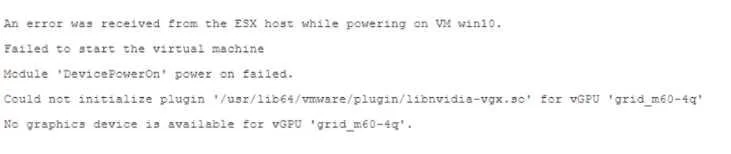
A Windows IO VM fails to power on With an NVIDIA vCPU profile in ESXi 7. The VM is configured with NVIDIA profile by selecting Shared PCl Device, adding the NVIDIA GRID vCPU device. and selecting the Profile under VM settings. The following error message is displayed in the vSphere web client:
What should be done to resolve this issue?
Exhibit
Options
- AChange the Graphics mode of the host from Shared to Shared Direct
- BChange the Graphics mode of the host from Shared to Shared Direct
- CSwitch the GPU mode to graphics mode using gpumodeswitch command.
- Dchange the Graphics mode of the host from Shared Direct to Shared.
- ESwitch the GPU mode to compute mode using gpumodeswitch command.
How the community answered
(45 responses)- A2% (1)
- B2% (1)
- C76% (34)
- D7% (3)
- E13% (6)
Explanation
gpumodeswitch is a command-line tool that is used to switch supported NVIDIA GPUs between compute and graphics mode. Compute mode allows multiple VMs to share a GPU for CUDA workloads. Graphics mode allows a single VM to use a GPU for graphics workloads.
Topics
Community Discussion
No community discussion yet for this question.