
NCA-5.15 · Question #86
Refer to the exhibit. An administrator has enabled Pulse, but is getting the error shown in the exhibit. What is causing this error message?
The correct answer is C. Firewall misconfiguration. Nutanix Pulse is a telemetry and proactive support feature that phones home diagnostic data to Nutanix's cloud portal (insights.nutanix.com) over HTTPS on port 443. When Pulse is enabled but shows a connectivity or upload error, the most common root cause is a firewall or proxy…
Question
Refer to the exhibit. An administrator has enabled Pulse, but is getting the error shown in the exhibit. What is causing this error message?
Exhibit
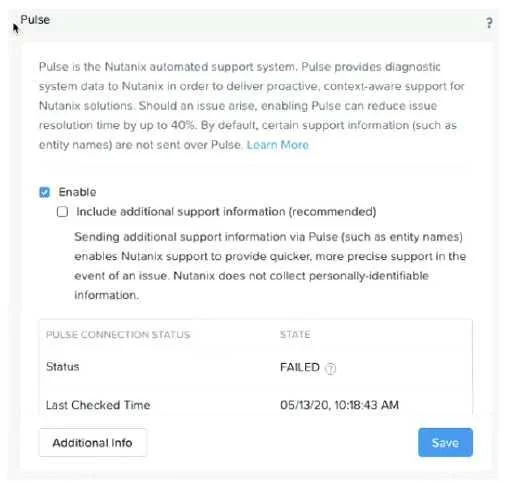
Options
- ASubscription expired
- BIncorrect licensing
- CFirewall misconfiguration
- DExpired SSL certificate
How the community answered
(42 responses)- A2% (1)
- B5% (2)
- C93% (39)
Explanation
Nutanix Pulse is a telemetry and proactive support feature that phones home diagnostic data to Nutanix's cloud portal (insights.nutanix.com) over HTTPS on port 443. When Pulse is enabled but shows a connectivity or upload error, the most common root cause is a firewall or proxy blocking outbound traffic from the Nutanix cluster to Nutanix's external endpoints. A subscription issue would show a licensing error, not a connectivity error. SSL certificate issues would produce certificate validation errors. Incorrect licensing would be a separate type of alert. Firewall misconfiguration is the standard cause of Pulse communication failures.
Topics
Community Discussion
No community discussion yet for this question.