
NCA-5.15 · Question #38
Refer to the exhibit. During VM creation, an administrator clicked on Add New NIC, but there is nothing in the Network Name dropdown list. What is causing this issue?
The correct answer is D. A network was not created during Network Configuration. In Nutanix AHV, virtual machine NICs must be attached to a pre-configured virtual network (VLAN-backed network or VPC subnet). Before any network appears in the dropdown during VM creation, an administrator must first define at least one network in Prism Element under Network…
Question
Refer to the exhibit. During VM creation, an administrator clicked on Add New NIC, but there is nothing in the Network Name dropdown list. What is causing this issue?
Exhibit
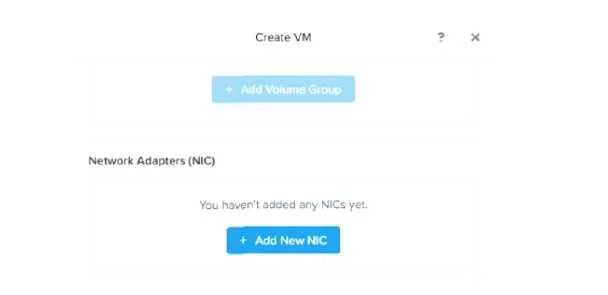
Options
- ANo physical NICs have been allocated for user VMs
- BThe nodes nave no NiCs attached to them
- COnly 1G NIC is attached to the Nutanix nodes
- DA network was not created during Network Configuration
How the community answered
(43 responses)- A5% (2)
- B2% (1)
- C2% (1)
- D91% (39)
Explanation
In Nutanix AHV, virtual machine NICs must be attached to a pre-configured virtual network (VLAN-backed network or VPC subnet). Before any network appears in the dropdown during VM creation, an administrator must first define at least one network in Prism Element under Network Configuration (Settings → Network Configuration). If this step was skipped, the list is empty. The issue has nothing to do with physical NIC availability (A, B, C) - physical NICs are managed at the host level and are separate from the logical virtual networks presented to VMs.
Topics
Community Discussion
No community discussion yet for this question.