
NCA-5.15 · Question #34
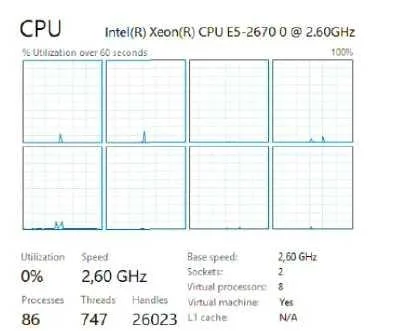
Refer to the exhibit. An administrator needs to upgrade a VM to 10 virtual processors. Which action should the administrator take to complete this task?
The correct answer is C. Update the VM adding two cores. In Nutanix AHV, total virtual processors = number of vCPUs × cores per vCPU. Based on the exhibit, the VM is configured with 2 vCPUs × 4 cores = 8 virtual processors. To reach 10, the administrator adds 1 core per vCPU (4 → 5), yielding 2 vCPUs × 5 cores = 10 virtual…
Question
Refer to the exhibit. An administrator needs to upgrade a VM to 10 virtual processors. Which action should the administrator take to complete this task?
Exhibit
Options
- APower-off the VM and add one vCPU
- BUpdate the VM adding two vCPUs
- CUpdate the VM adding two cores
- DPower-off the VM and add one core
How the community answered
(27 responses)- A4% (1)
- B11% (3)
- C78% (21)
- D7% (2)
Explanation
In Nutanix AHV, total virtual processors = number of vCPUs × cores per vCPU. Based on the exhibit, the VM is configured with 2 vCPUs × 4 cores = 8 virtual processors. To reach 10, the administrator adds 1 core per vCPU (4 → 5), yielding 2 vCPUs × 5 cores = 10 virtual processors. This is accomplished by editing the VM and increasing the cores-per-vCPU value - no power-off is required if the guest OS supports CPU hot-add. Adding a vCPU (options A/B) would overshoot or require a power cycle, and option D also specifies a power-off unnecessarily.
Topics
Community Discussion
No community discussion yet for this question.