
NCA-5.15 · Question #3
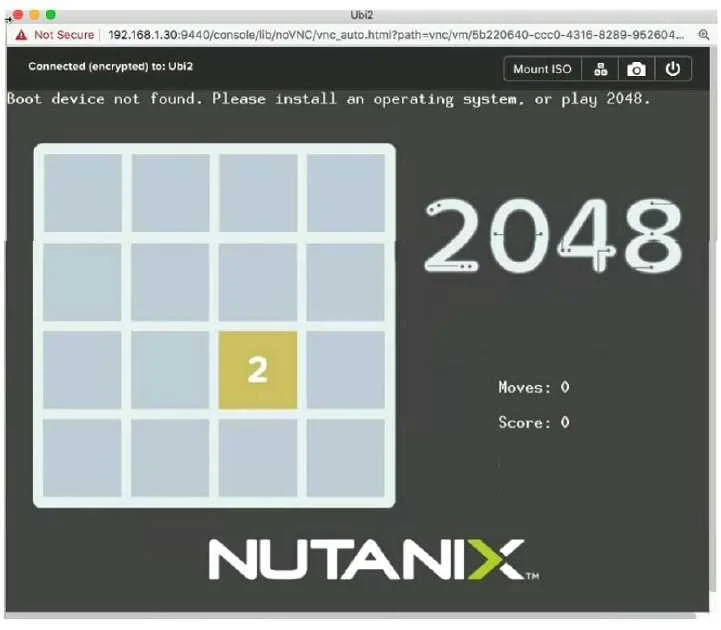
Refer to the exhibit. An administrator has created a new VM, but when accessing the console to monitor the guest install, the administrator sees the error shown in the exhibit. What is the likely…
The correct answer is A. The installation media was not mounted. The error shown (typically a 'No bootable device found' or blank boot screen) occurs when the VM has no installation media to boot from. When creating a VM for a fresh OS installation, the ISO image must be attached (mounted) as a CD-ROM/virtual optical drive so the VM can boot…
Question
Refer to the exhibit. An administrator has created a new VM, but when accessing the console to monitor the guest install, the administrator sees the error shown in the exhibit. What is the likely cause of this issue?
Exhibit
Options
- AThe installation media was not mounted.
- BThe wrong type of disk was specified.
- CThe boot order is incorrectly configured.
- DThe Nuianix VirtlO driver (SO was not mounted.
How the community answered
(23 responses)- A91% (21)
- B4% (1)
- D4% (1)
Explanation
The error shown (typically a 'No bootable device found' or blank boot screen) occurs when the VM has no installation media to boot from. When creating a VM for a fresh OS installation, the ISO image must be attached (mounted) as a CD-ROM/virtual optical drive so the VM can boot into the installer. If the ISO is not mounted, the VM finds no bootable device and displays this error. Incorrect disk type (B) or boot order (C) can cause similar symptoms, but the most common and likely cause for a brand-new VM is simply forgetting to attach the installation ISO. The VirtIO driver ISO (D) is needed after the OS installer loads, not at initial boot.
Topics
Community Discussion
No community discussion yet for this question.