
N10-009 · Question #189
A user reports having intermittent connectivity issues to the company network. The network configuration for the user reveals the following: - IP address: 192.168.1.10 - Subnet mask: 255.255.255.0…
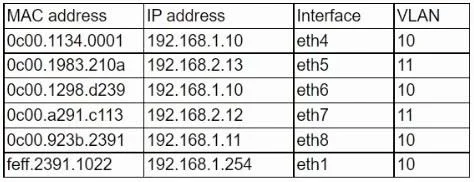
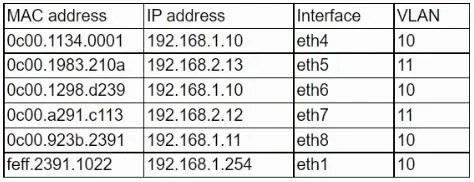
The correct answer is C. Another PC with manually configured IP. This scenario describes a duplicate IP address. The ARP table shows two different MAC addresses (0c00.1134.0001 and 0c00.1298.d239) associated with the same IP address (192.168.1.10), which leads to ARP table conflicts and intermittent connectivity. Duplicate IP addresses occur…
Question
A user reports having intermittent connectivity issues to the company network. The network configuration for the user reveals the following:
- IP address: 192.168.1.10
- Subnet mask: 255.255.255.0
- Default gateway: 192.168.1.254
The network switch shows the following ARP table:
Which of the following is the most likely cause of the user's connection issues?
Exhibits
Options
- AA port with incorrect VLAN assigned
- BA switch with spanning tree conflict
- CAnother PC with manually configured IP
- DA router with overlapping route tables
How the community answered
(28 responses)- A7% (2)
- B29% (8)
- C50% (14)
- D14% (4)
Explanation
This scenario describes a duplicate IP address. The ARP table shows two different MAC addresses (0c00.1134.0001 and 0c00.1298.d239) associated with the same IP address (192.168.1.10), which leads to ARP table conflicts and intermittent connectivity. Duplicate IP addresses occur when two devices on the same network are assigned the same IP address, causing network conflicts. Common issues include manual configuration errors or DHCP lease issues. Resolution includes using IP management tools and avoiding overlaps in DHCP and static IP assignments.
Community Discussion
No community discussion yet for this question.