
MS-900 · Question #89
Hotspot Question You need to configure a data governance solution for your company. The solution must meet the following requirements: - Classify documents - Ensure that classifications are enforced…
The correct answer is Classify documents: Publish labels.; Ensure that classifications are enforced.: Apply supervision policies.; Delete documents that are no longer used.: Apply retention policies. To implement data governance in Microsoft 365, you must publish labels to classify content, apply supervision policies to monitor and enforce compliance, and use retention policies to manage the automatic deletion of old documents.
Question
Exhibit
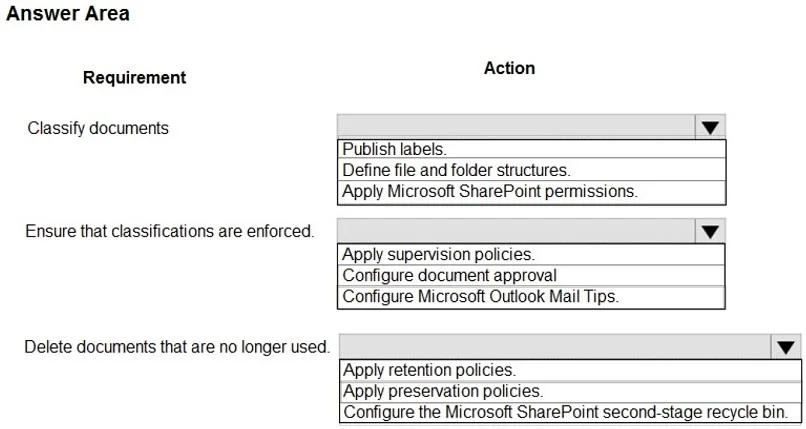
Answer Area
- Classify documentsPublish labels.Publish labels.Define file and folder structures.Apply Microsoft SharePoint permissions.
- Ensure that classifications are enforced.Apply supervision policies.Apply supervision policies.Configure document approval.Configure Microsoft Outlook Mail Tips.
- Delete documents that are no longer used.Apply retention policies.Apply retention policies.Apply preservation policies.Configure the Microsoft SharePoint second-stage recycle bin.
Explanation
To implement data governance in Microsoft 365, you must publish labels to classify content, apply supervision policies to monitor and enforce compliance, and use retention policies to manage the automatic deletion of old documents.
Approach. 1. Classify documents -> Publish labels: In Microsoft 365, data classification is achieved by creating sensitivity or retention labels and publishing them via label policies so that users (or auto-labeling rules) can apply them to documents. 2. Ensure that classifications are enforced -> Apply supervision policies: Supervision policies (now evolved into Communication Compliance) are used to capture and monitor employee communications to ensure that corporate policies-such as the proper handling of classified or sensitive data-are actively enforced. 3. Delete documents that are no longer used -> Apply retention policies: Retention policies govern the lifecycle of data. They can be configured to not only retain data for compliance but also to automatically delete documents after a specified time period has elapsed, effectively removing unused data.
Common mistakes.
- common_mistake. A common mistake is selecting 'Configure Microsoft Outlook Mail Tips' to enforce classifications; however, Mail Tips only provide informational warnings to users and do not actively enforce compliance. Additionally, selecting 'Apply preservation policies' for deleting documents is incorrect because preservation policies historically only held data to prevent deletion, whereas Retention Policies are designed to handle both retention and automated deletion.
Concept tested. Microsoft 365 Information Protection and Data Lifecycle Management (Labels, Compliance/Supervision, and Retention Policies)
Reference. https://learn.microsoft.com/en-us/microsoft-365/compliance/manage-data-governance
Topics
Community Discussion
No community discussion yet for this question.