
MS-900 · Question #437
Drag and Drop Question A company deploys Azure App Services apps in Azure. Users authenticate to the apps by using single sign-on (SSO). The company requires access to the apps from the following…
The correct answer is Azure AD registered device; Hybrid Azure AD joined device. Azure AD Registered devices are designed for personal (BYOD) devices where users sign in with a personal account rather than an organizational account, allowing access to company resources without requiring the device to be domain-joined. Hybrid Azure AD Joined devices are the…
Question
Exhibit
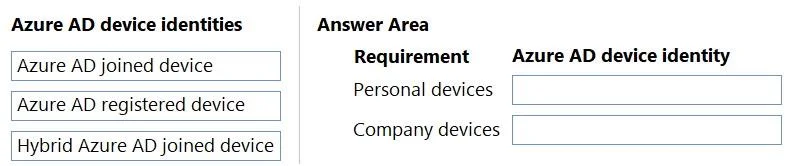
Answer Area
Drag items
Correct arrangement
- Azure AD registered device
- Hybrid Azure AD joined device
Explanation
Azure AD Registered devices are designed for personal (BYOD) devices where users sign in with a personal account rather than an organizational account, allowing access to company resources without requiring the device to be domain-joined. Hybrid Azure AD Joined devices are the correct choice for company-owned devices already joined to on-premises Active Directory, as this configuration automatically syncs and provisions them in Azure AD using Azure AD Connect, satisfying the requirement for automatic provisioning. Azure AD Joined devices are cloud-only joined devices that require an organizational account at sign-in and are not automatically provisioned from on-premises AD, making them unsuitable for either scenario described.
Topics
Community Discussion
No community discussion yet for this question.