
MS-900 · Question #31
Hotspot Question You implement Microsoft Azure Information Protection. For each of the following statements, select Yes if the statement is true. Otherwise, select No. NOTE: Each correct selection…
The correct answer is You can supplement the default templates to apply restrictive controls. = Yes; Classification and protection information is available for on-premises file servers. = Yes; Installing the Azure Information Protection client installs an information protection bar to Microsoft Excel. = Yes. All three statements accurately describe features and capabilities of Microsoft Azure Information Protection.
Question
Exhibit
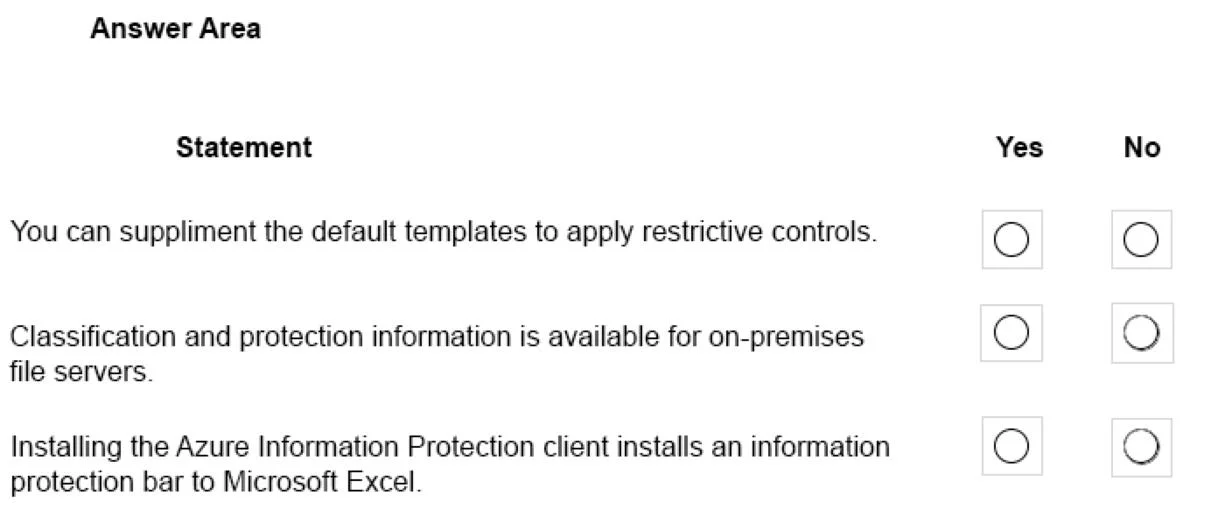
Answer Area
- You can supplement the default templates to apply restrictive controls.Yes
- Classification and protection information is available for on-premises file servers.Yes
- Installing the Azure Information Protection client installs an information protection bar to Microsoft Excel.Yes
Explanation
All three statements accurately describe features and capabilities of Microsoft Azure Information Protection.
Approach. Select 'Yes' for all statements. 1) AIP allows administrators to create custom labels and protection templates to supplement default ones, enabling specific restrictive controls like 'Do Not Forward'. 2) The Azure Information Protection (AIP) Scanner specifically extends classification, labeling, and protection capabilities to data residing on on-premises file servers (SMB shares) and on-premises SharePoint sites. 3) Installing the AIP client installs an Office add-in that displays a visible Information Protection bar below the ribbon in applications like Microsoft Excel, allowing users to easily select and apply sensitivity labels.
Common mistakes.
- common_mistake. Candidates might mistakenly select 'No' for the second statement if they assume 'Azure' Information Protection is strictly a cloud-only tool, unaware of the AIP Scanner's role in hybrid environments. They might select 'No' for the third statement if they are only familiar with the newer native sensitivity labeling built directly into Microsoft 365 Apps, which does not require the separate AIP client installation to show labeling options on the ribbon.
Concept tested. Microsoft Azure Information Protection (AIP) core features, including custom protection templates, the AIP Scanner for on-premises data discovery, and Office application client integration.
Reference. https://learn.microsoft.com/en-us/azure/information-protection/what-is-information-protection
Topics
Community Discussion
No community discussion yet for this question.