
MS-900 · Question #272
Hotspot Question A company uses an on-premises deployment of Configuration Manager to manage workloads on its Windows desktops. The company purchases an Intune subscription. The company must attach…
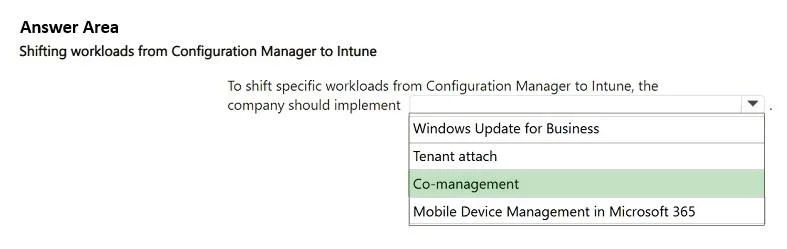
The correct answer is To shift specific workloads from Configuration Manager to Intune, the company should implement: Co-management. Co-management is the correct solution for enabling simultaneous management of Windows devices by Configuration Manager and Intune, facilitating the gradual shift of workloads to the cloud.
Question
Exhibit
Answer Area
- To shift specific workloads from Configuration Manager to Intune, the company should implementCo-managementWindows Update for BusinessTenant attachCo-managementMobile Device Management in Microsoft 365
Explanation
Co-management is the correct solution for enabling simultaneous management of Windows devices by Configuration Manager and Intune, facilitating the gradual shift of workloads to the cloud.
Approach. The correct interaction is to select 'Co-management' from the dropdown list. The scenario explicitly states the company needs to 'attach the existing Configuration Manager deployment to the Microsoft 365 cloud to shift specific workloads from Configuration Manager to Intune'. Co-management is the Microsoft solution designed for this exact purpose. It allows Windows 10/11 devices to be simultaneously managed by both Configuration Manager (on-premises) and Microsoft Intune (cloud-based), enabling administrators to gradually shift management authority for various workloads (such as compliance policies, Windows Update policies, resource access, endpoint protection, and client apps) from Configuration Manager to Intune.
Common mistakes.
- common_mistake. Selecting 'Tenant attach' is a common mistake. While 'Tenant attach' (also known as cloud attach) is an important step in integrating Configuration Manager with the cloud, allowing visibility of on-premises devices in the Microsoft Intune admin center and enabling some remote actions, it does not, by itself, enable the shifting of management authority for specific workloads. That specific capability is provided by co-management. 'Windows Update for Business' is a specific feature that can be managed via co-management or Intune, but it's not the overarching solution for shifting all workloads. 'Mobile Device Management in Microsoft 365' refers to Basic Mobility and Security for Microsoft 365, which is a limited MDM solution not intended for integrating with and migrating workloads from an existing Configuration Manager environment; Intune is the robust solution for that.
Concept tested. Hybrid management of Windows devices, specifically the understanding of co-management, tenant attach, and their respective roles in integrating Microsoft Configuration Manager with Microsoft Intune for cloud-based device management and workload transition.
Topics
Community Discussion
No community discussion yet for this question.