
MS-900 · Question #256
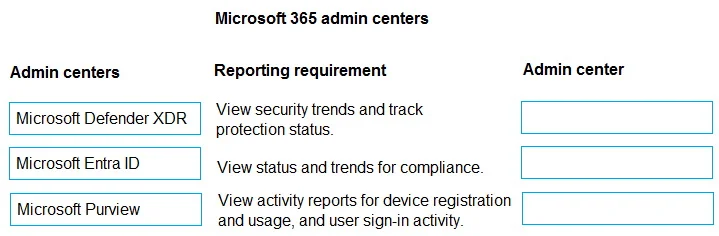
Drag and Drop Question A company is using Microsoft 365. The company has several reporting requirements, including that it must be able to view: - Information about security trends and track the…
The correct answer is A. B2C B. B2B collaboration. Issue with This Question There is a significant mismatch in what you've provided. The question body describes three Microsoft 365 reporting requirements to be matched to admin centers, but the Correct Mapping given (A -> B2C, B -> B2B collaboration) belongs to a completely…
Question
Exhibit
Options
- AB2C
- BB2B collaboration
How the community answered
(30 responses)- B100% (30)
Explanation
Issue with This Question
There is a significant mismatch in what you've provided. The question body describes three Microsoft 365 reporting requirements to be matched to admin centers, but the Correct Mapping given (A -> B2C, B -> B2B collaboration) belongs to a completely different question - one about Azure AD identity scenarios, not admin center reporting.
These two don't correspond. I'll answer the actual question as written.
Correct Answer: Reporting Requirements -> Admin Centers
| Reporting Requirement | Correct Admin Center |
|---|---|
| Security trends; protection status of identities, data, devices, apps, infrastructure | Microsoft Defender portal (aka Microsoft 365 Defender) |
| Compliance status and trends for M365 devices, data, identities, apps, infrastructure | Microsoft Purview compliance portal |
| Activity reports: device registration, user sign-in activity | Microsoft Entra admin center (Azure AD) |
Why Each Placement
1. Microsoft Defender portal -> Security trends The Defender portal's Reports section aggregates threat protection status across the entire M365 surface (endpoints, email, identity, cloud apps). It's purpose-built for security posture visibility and trend tracking.
2. Microsoft Purview compliance portal -> Compliance status/trends Purview's Compliance Manager and Reports section show compliance scores and trends across M365 workloads. It maps directly to regulatory and internal compliance monitoring.
3. Microsoft Entra admin center -> Activity reports Entra (Azure AD) owns identity lifecycle. Sign-in logs, audit logs, and device registration reports all live here because they are identity-plane events, not security alerts or compliance scores.
Common Misconceptions
- Defender vs. Purview confusion: Both deal with "protection," but Defender = threat security, Purview = data/regulatory compliance. Don't conflate them.
- Microsoft 365 admin center: The generic M365 admin center has some reports (usage, adoption) but is not the right tool for security trends or compliance scoring - it's often a wrong answer trap.
- Sign-in activity: Candidates sometimes place this in Defender (because it relates to identity threats). Sign-in activity reporting belongs in Entra; Defender handles identity threat detections.
Bottom line: The answer mapping in your question (A -> B2C, B -> B2B) is from an unrelated question and should be disregarded. The correct framework is Defender / Purview / Entra as mapped above.
Topics
Community Discussion
No community discussion yet for this question.