
MS-900 · Question #250
Hotspot Question A company plans to implement Microsoft Purview Information Protection. Instructions: For each of the following statements, select Yes if the statement is true. Otherwise, select No…
The correct answer is You can use sensitivity labels to allow users in another organization to review the content of an encrypted email for a specified number of days. = Yes; You can use sensitivity labels to add a watermark to the body of an email. = Yes; You can use sensitivity labels to protect content in Microsoft Teams sites, Microsoft 365 groups, and SharePoint sites. = Yes. All three statements are true regarding the capabilities of Microsoft Purview Information Protection sensitivity labels: they support time-limited external access to encrypted content, can apply watermarks to email bodies, and protect content within Microsoft 365 containers…
Question
Exhibit
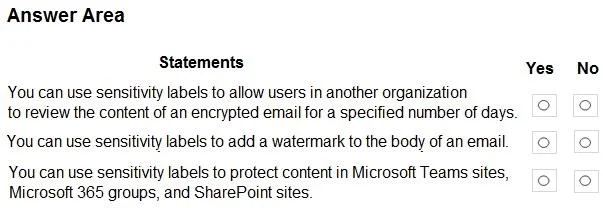
Answer Area
- You can use sensitivity labels to allow users in another organization to review the content of an encrypted email for a specified number of days.Yes
- You can use sensitivity labels to add a watermark to the body of an email.Yes
- You can use sensitivity labels to protect content in Microsoft Teams sites, Microsoft 365 groups, and SharePoint sites.Yes
Explanation
All three statements are true regarding the capabilities of Microsoft Purview Information Protection sensitivity labels: they support time-limited external access to encrypted content, can apply watermarks to email bodies, and protect content within Microsoft 365 containers like Teams, Groups, and SharePoint sites.
Approach. For each statement, the correct interaction is to select the 'Yes' radio button.
Common mistakes.
- common_mistake. The most common mistake would be selecting 'No' for any of the three statements.
- reasoning. 1. Selecting 'No' for the first statement is incorrect because sensitivity labels, through their underlying encryption services, fully support defining access for external users with time-based restrictions. This is a key feature for controlled external collaboration.
- Selecting 'No' for the second statement is incorrect because Microsoft documentation explicitly states that sensitivity labels can apply watermarks directly to email messages as a form of visual marking, alongside headers and footers.
- Selecting 'No' for the third statement is incorrect because extending sensitivity labels to protect Microsoft 365 containers (Teams, Groups, SharePoint sites) is a core and widely used capability, enabling consistent data governance and protection across an organization's collaborative workspaces.
Concept tested. The core concept tested is a comprehensive understanding of Microsoft Purview Information Protection sensitivity labels, including their capabilities for encryption and access control (especially for external users and time-based access), visual markings for emails and documents, and their application to protect Microsoft 365 containers (Teams, Microsoft 365 Groups, and SharePoint sites).
Reference. https://learn.microsoft.com/en-us/microsoft-365/compliance/sensitivity-labels-visual-markings?view=o365-worldwide https://learn.microsoft.com/en-us/microsoft-365/compliance/sensitivity-labels-teams-groups-sites?view=o365-worldwide https://learn.microsoft.com/en-us/microsoft-365/compliance/encryption-sensitivity-labels?view=o365-worldwide
Topics
Community Discussion
No community discussion yet for this question.