
MS-900 · Question #249
Drag and Drop Question A company has a hybrid environment and plans to implement Microsoft Defender XDR services. Users authenticate to Microsoft 365 by using Active Directory Federation Services…
The correct answer is Defender for Identity; Defender for Office 365; Defender for Endpoint. Defender XDR Service Matching - Explanation Requirement -> Service Mapping --- 1. Detect authentication attempts to AD FS from attackers -> Defender for Identity Defender for Identity is specifically designed to monitor on-premises identity infrastructure, including Active…
Question
Exhibit
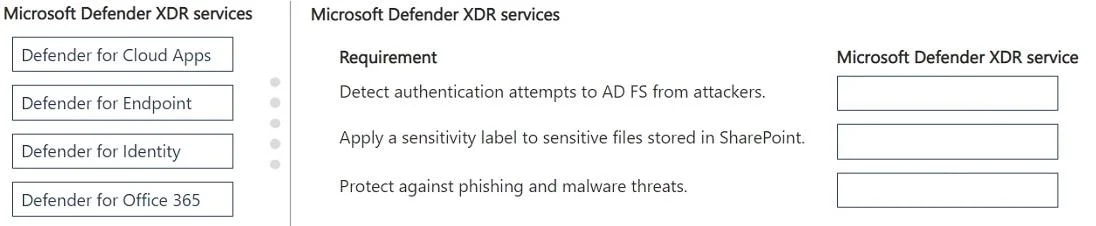
Answer Area
Drag items
Correct arrangement
- Defender for Identity
- Defender for Office 365
- Defender for Endpoint
Explanation
Defender XDR Service Matching - Explanation
Requirement -> Service Mapping
1. Detect authentication attempts to AD FS from attackers -> Defender for Identity
Defender for Identity is specifically designed to monitor on-premises identity infrastructure, including Active Directory Domain Services (AD DS) and AD FS. It analyzes authentication traffic, detects brute-force attacks, pass-the-hash, lateral movement, and other suspicious sign-in patterns directed at federation services. No other Defender XDR service has visibility into on-premises AD FS authentication events.
2. Apply sensitivity labels to sensitive files in SharePoint -> Defender for Office 365
Defender for Office 365 extends protection to SharePoint Online, OneDrive, and Teams (Safe Attachments/Safe Links integration). It works alongside Microsoft Purview to enforce and trigger sensitivity label policies on files stored in SharePoint. This is the Defender service scoped to Microsoft 365 content workloads.
3. Protect against phishing and malware threats -> Defender for Endpoint
Defender for Endpoint includes Web Protection (powered by SmartScreen and Network Protection), which blocks phishing sites and malware downloads at the device/endpoint level - before the threat reaches the user. It also provides anti-malware scanning and behavioral analysis on endpoints.
Common Misconceptions
| Mistake | Why it's wrong |
|---|---|
| Choosing Defender for Office 365 for phishing/malware | Office 365 Defender protects email-delivered threats; the question implies endpoint-level phishing/malware protection, which is Endpoint's domain |
| Choosing Defender for Cloud Apps for SharePoint labels | Cloud Apps is a CASB (cloud access broker) for app-level governance; sensitivity labels on SharePoint content fall under Office 365 Defender's scope in this context |
| Choosing Defender for Endpoint for AD FS detection | Endpoint has no visibility into AD FS authentication flows - that's exclusively Identity's territory |
Quick Memory Rule
- Identity = on-prem AD/AD FS monitoring
- Office 365 = Microsoft 365 content (email, SharePoint, Teams)
- Endpoint = device-level threats (malware, phishing at the OS/browser level)
- Cloud Apps = CASB / third-party SaaS governance (not needed here)
Topics
Community Discussion
No community discussion yet for this question.