
MS-720 · Question #65
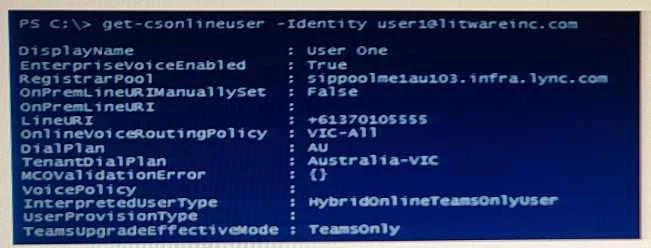
You have a Microsoft Teams Phone deployment. The 613 7010 5XXX phone number range is allocated to the Session Border Controller (SBC). A user named User1 is configured as shown in the following…
The correct answer is A. Set-CsOnlineUser [email protected] -TelephoneNumber "+61370105555" D. Set-CsUser [email protected] -EnterpriseVoiceEnabled $false. User1 cannot receive inbound calls because no telephone number is assigned in Teams Online, and a conflicting on-premises Enterprise Voice attribute is interfering with proper call routing.
Question
Exhibit
Options
- ASet-CsOnlineUser [email protected] -TelephoneNumber "+61370105555"
- BSet-CsOnlineUser [email protected] -EnterpriseVoiceEnabled $null
- CSet-CsUser [email protected] -OnPremLineURI "tel:+61370105555"
- DSet-CsUser [email protected] -EnterpriseVoiceEnabled $false
- EGrant-CsOnlineVoiceRoutingPolicy -Identity [email protected] -PolicyName $null
How the community answered
(31 responses)- A84% (26)
- B3% (1)
- C3% (1)
- E10% (3)
Why each option
User1 cannot receive inbound calls because no telephone number is assigned in Teams Online, and a conflicting on-premises Enterprise Voice attribute is interfering with proper call routing.
Set-CsOnlineUser with -TelephoneNumber '+61370105555' assigns a number from the SBC-allocated range to the user's Teams Online profile, which is required for the SBC to route inbound Direct Routing calls to this specific user. Without a TelephoneNumber set on the cloud user object, the SBC has no destination to forward the inbound call to, resulting in the error external callers receive.
Setting -EnterpriseVoiceEnabled to $null via Set-CsOnlineUser is not a valid parameter value and does not resolve the missing telephone number or the on-premises attribute conflict causing inbound call failures.
Set-CsUser -OnPremLineURI is used to configure line URIs for on-premises Skype for Business or hybrid users, and applying it to a cloud-only Teams Phone user would not fix inbound routing - it is the wrong cmdlet and scope for this deployment model.
Set-CsUser -EnterpriseVoiceEnabled $false clears the on-premises Enterprise Voice attribute, which resolves a routing conflict that arises when both on-premises and online voice configurations are active on the same user object. In a hybrid or migrated environment, a residual on-prem EnterpriseVoiceEnabled setting can override or interfere with the cloud-side Teams Phone configuration, preventing proper inbound call delivery.
Grant-CsOnlineVoiceRoutingPolicy with -PolicyName $null removes the user's voice routing policy entirely, which would break the outbound calling capability that is currently functioning correctly.
Concept tested: Teams Phone Direct Routing number assignment and hybrid voice conflict resolution
Source: https://learn.microsoft.com/en-us/microsoftteams/direct-routing-configure
Topics
Community Discussion
No community discussion yet for this question.