
MS-720 · Question #27
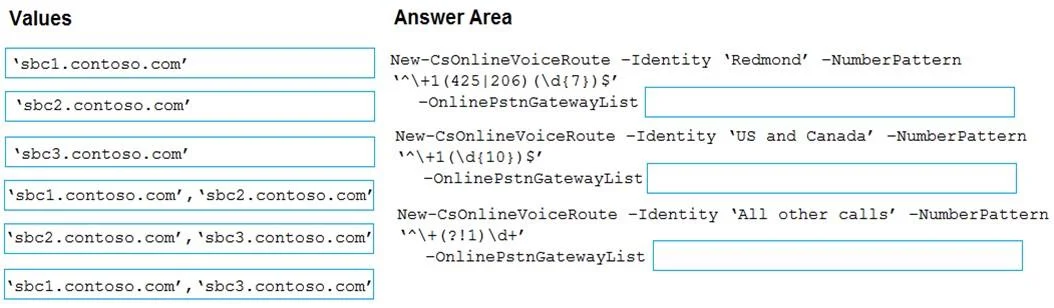
Drag and Drop Question Your company has offices in Seattle. You deploy Microsoft Teams Phone. You have three Session Border Controller (SBCs) named SBC1, SBC2, and SBC3. You need to configure voice…
The correct answer is *sbc1.contoso.com*, 'sbc2.contoso.com'; *sbc2.contoso.com*; *sbc2.contoso.com*, 'sbc3.contoso.com'. This question tests configuration of Microsoft Teams Phone Direct Routing voice routes using PowerShell, specifically how to assign and order SBCs in the -OnlinePstnGatewayList parameter to enforce priority and failover behavior.
Question
Exhibit
Answer Area
Drag items
Correct arrangement
- sbc1.contoso.com, 'sbc2.contoso.com'
- sbc2.contoso.com
- sbc2.contoso.com, 'sbc3.contoso.com'
Explanation
This question tests configuration of Microsoft Teams Phone Direct Routing voice routes using PowerShell, specifically how to assign and order SBCs in the -OnlinePstnGatewayList parameter to enforce priority and failover behavior.
Approach. In Teams Direct Routing, the New-CsOnlineVoiceRoute cmdlet accepts a -OnlinePstnGatewayList parameter where SBCs are listed in priority order - Teams tries each SBC left to right, failing over to the next if the previous is unavailable. For local Seattle area codes (425/206), the list must be 'sbc1.contoso.com, sbc2.contoso.com' so SBC1 is tried first with SBC2 as failover. For all other US/Canada calls, only 'sbc2.contoso.com' is needed since no failover is required. For international calls, 'sbc2.contoso.com, sbc3.contoso.com' satisfies the requirement that either SBC2 or SBC3 can handle the call, with SBC2 attempted first.
Concept tested. Microsoft Teams Phone Direct Routing - configuring voice routes via PowerShell (New-CsOnlineVoiceRoute) with ordered SBC gateway lists to enforce primary/failover routing for local, domestic, and international call patterns.
Reference. https://learn.microsoft.com/en-us/microsoftteams/direct-routing-voice-routing
Topics
Community Discussion
No community discussion yet for this question.