
MS-720 · Question #12
Case Study 2 - Litware, Inc Overview General Overview The network contains an Active Directory forest named contoso.com that syncs to Microsoft 365 by using Azure AD Connect. Domain controllers run…
Analysis Note The answer mapping data appears to be empty in this question (both source_items and correct_arrangement are []). This likely means the answer options weren't captured when the question was exported. I'll reconstruct the correct answer based on the technical…
Question
Exhibit
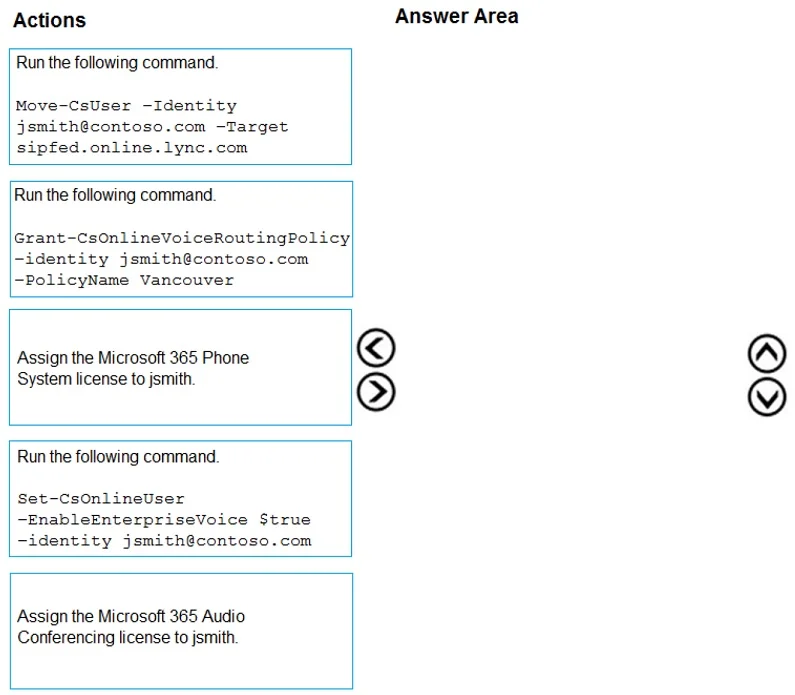
Answer Area
Explanation
Analysis Note
The answer mapping data appears to be empty in this question (both source_items and correct_arrangement are []). This likely means the answer options weren't captured when the question was exported. I'll reconstruct the correct answer based on the technical scenario.
Context: What's Happening Here
Contoso is migrating from Skype for Business Server 2015 to Microsoft Teams using Direct Routing. jsmith is a Vancouver user, and Vancouver is the pilot site. Two key requirements apply specifically to Vancouver users:
- Media path must be optimized during the pilot → requires Local Media Optimization (LMO)
- Must be able to place emergency calls even without internet → requires the on-premises SBA to remain functional during transition
Correct Migration Sequence
For a user migration from on-premises Skype for Business Server to Teams with Direct Routing, the three steps in order are:
Step 1: Run Move-CsUser to move jsmith to Microsoft 365 / Teams
Move-CsUser -Identity "[email protected]" -Target "sipfed.online.lync.com" -MoveToTeams -Credential $cred
Why first: The user's identity and home server must be moved from on-premises AD/SfB to Azure AD / Teams before any cloud-side policies can take effect. You cannot assign Teams policies to a user still homed on-premises. The -MoveToTeams flag simultaneously sets the upgrade policy to TeamsOnly.
Common mistake: Trying to assign voice routing policies before moving the user. The cmdlets will either fail or silently have no effect because the user is still homed on-premises.
Step 2: Assign an Online Voice Routing Policy (Grant-CsOnlineVoiceRoutingPolicy)
Grant-CsOnlineVoiceRoutingPolicy -Identity "[email protected]" -PolicyName "Vancouver-VRP"
Why second: After the user is in the cloud, you need to tell Teams how to route outbound calls through Direct Routing (i.e., which SBC/PSTN gateway to use). Without this policy, the user has no dial-out capability via the Vancouver SBC. This policy maps to a PSTN usage that connects to the Vancouver SBC-which also enables Local Media Optimization for the pilot requirement.
Common mistake: Skipping this step and wondering why calls fail post-migration. E3 licenses don't automatically enable Direct Routing routing.
Step 3: Assign a phone number to the user (Set-CsPhoneNumberAssignment or Set-CsUser)
Set-CsPhoneNumberAssignment -Identity "[email protected]" -PhoneNumber "+1XXXXXXXXXX" -PhoneNumberType DirectRouting
Why third: The user must have a phone number assigned in the cloud after being moved, and this requires the user to already be TeamsOnly and have a voice routing policy active. The number must be typed as DirectRouting (not Calling Plan) since Contoso is using Direct Routing via the Vancouver SBC/PRI.
Common mistake: Using the old
Set-CsUser -LineUrisyntax without updating to the newerSet-CsPhoneNumberAssignmentcmdlet, or assigning a Calling Plan number instead of Direct Routing.
Why This Order Is Non-Negotiable
| Dependency | Reason |
|---|---|
| Move before policy | Cloud policies don't apply to on-prem homed users |
| Voice routing before number | Number assignment validates the routing policy is in place |
| TeamsOnly before calling | User must be in TeamsOnly mode to receive/make calls via Teams |
Vancouver-Specific Considerations
- LMO (Local Media Optimization): The voice routing policy must reference an SBC configured with
GatewayLbrEnabledUserOverrideand the correct network site. This is what "optimizes the media path" for the pilot. - Emergency calling (without internet): The on-premises SBA handles this even post-migration, as long as the SBC remains connected to the PRI. The migration of jsmith to Teams doesn't remove SBA functionality for emergency routing.
Topics
Community Discussion
No community discussion yet for this question.