
MS-600 · Question #108
Case Study 2 - Contoso Overview General Overview Contoso identifies the following business goals: Utilize core functionality of apps whenever possible. Reduce app development costs. Minimize…
The correct answer is A. App Catalog in SharePoint Online. An app catalog is a dedicated site collection in a SharePoint web application or SharePoint Online tenancy that hosts document libraries for Office and SharePoint Add-ins. To make Office Add-ins accessible to users within their organization, administrators can upload Office…
Question
Case Study 2 - Contoso Overview General Overview Contoso identifies the following business goals:
- Utilize core functionality of apps whenever possible.
- Reduce app development costs.
- Minimize training costs for end users.
Existing environment Microsoft 365 Contoso has a Microsoft 365 subscription that uses a domain named contoso.com. Each user is assigned a Microsoft 365 Enterprise E5 licence. Microsoft SharePoint/Microsoft Exchange Contoso moves all email accounts to Microsoft 365. Contoso migrates the SharePoint Server 2013 intranet sites of the research department to SharePoint Online. Problem Statement Contoso identifies the following issues:
- Users in the sales department report that prepanng quotations is time-consuming as it requires
manually copying and pasting data from multiple sources.
- Users in the HR department must use multiple apps to manage the hiring process.
- The solution to claim expenses requires multiple manual steps.
Requirements Business Goals Contoso identifies the following business goals:
- Utilize core functionality of apps whenever possible.
- Reduce app development costs.
- Minimize training costs for end users.
Planned Changes Contoso plans to implement the following changes;
- Redesign the SharePoint Online sites of the research department to provide users with an
expenence that is consistent with the Microsoft 365 portal. The research department has a third- party project management solution that uses the Microsoft identity platform in Azure AD.
- Create an email workflow solution for expense claims. Users will submit their expense claims
and the system will email an approval request to their manager.
- Implement a bring your own device (BYOD) model that supports Windows 10, macOS, and
Android devices.
- Develop a custom Microsoft 365 app named SalesApp for the sales department.
- Develop a custom Microsoft 365 app named HRApp for the HR department
Technical Requirements Contoso identifies the following technical requirements for app development:
- The expense claims solution must provide managers with claim information and the ability to
manage the claim by using Microsoft Outlook. Outlook on the web, or Outlook for iOS and Android.
- HRApp must include a bot named HRBot that will answer HR questions. Users must be able to
access the bot by ﹎entioning HRBot in a Microsoft Teams channel or private chat.
- HRApp must enable users to query a third-party HR system by using a tab from within a
Microsoft Teams channel.
- HRApp must include a messaging extension that enables users to search jobs by job title or job
ID.
- SalesApp must be integrated with Microsoft Word and must combine images and text from
multiple sources to create a quotation as a DOCX file.
- The distribution of SalesApp must be automatic and require minimal user interaction.
- Solutions for SharePoint Online and Microsoft Office must follow the current Office user
interface (Ul) design.
- Development tools and solutions must support Windows and non-Windows devices.
- Development effort must be minimized.
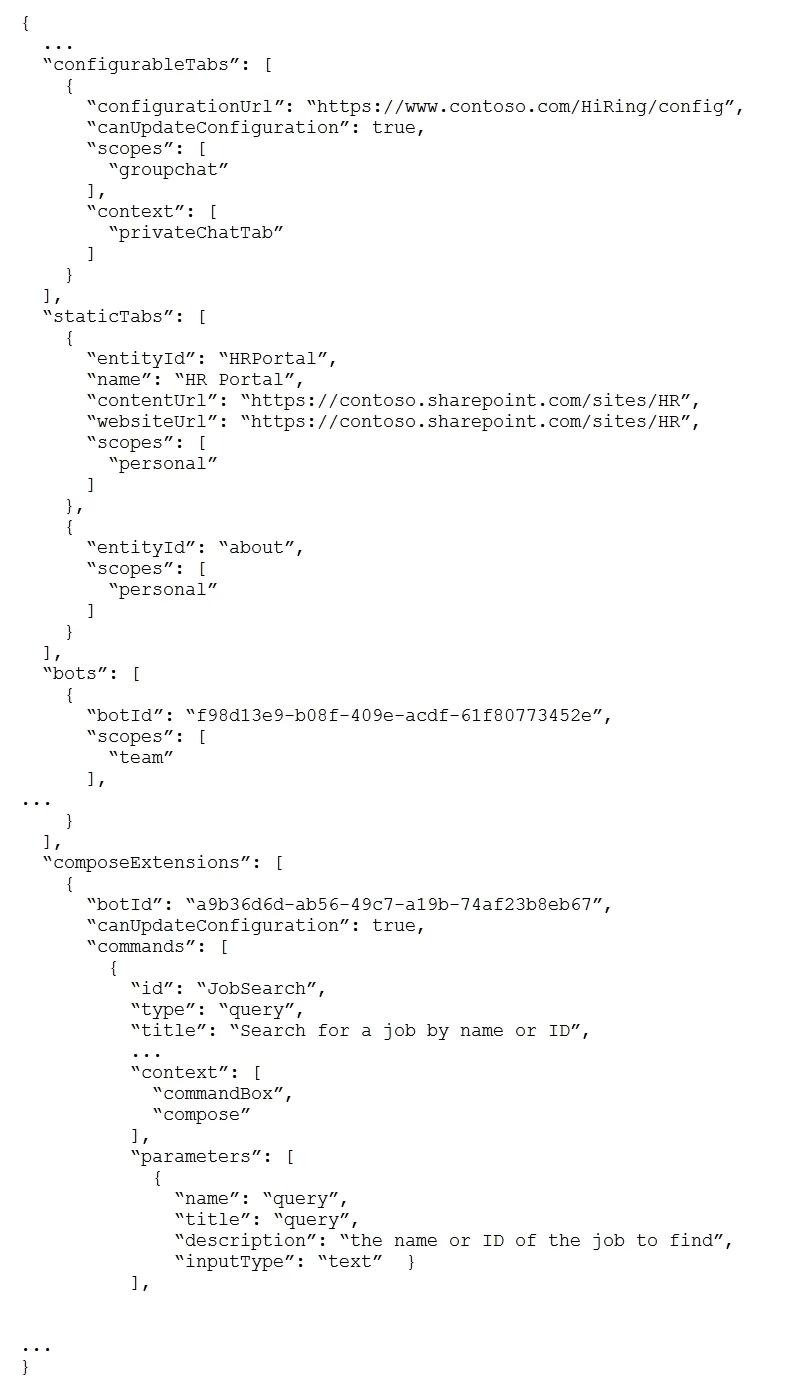
Security Requirement All solutions must support the Microsoft identity platform in Azure AD. Intranet components must not share access tokens. HRApp Manifest Question You need to provide users with access to SalesApp. The solution must meet the technical requirements. What should you include in the solution?
Exhibit
Options
- AApp Catalog in SharePoint Online
- Bsideloading
- CCentralized Deployment
- DMicrosoft AppSource
How the community answered
(26 responses)- A81% (21)
- B4% (1)
- C4% (1)
- D12% (3)
Explanation
An app catalog is a dedicated site collection in a SharePoint web application or SharePoint Online tenancy that hosts document libraries for Office and SharePoint Add-ins. To make Office Add-ins accessible to users within their organization, administrators can upload Office Add-ins manifest files to the app catalog for their organization. When an administrator registers an app catalog as a trusted catalog, users can insert the add-in from the insertion UI in an Office client SalesApp must be integrated with Microsoft Word and must combine images and text from multiple sources to create a quotation as a DOCX file. The distribution of SalesApp must be automatic and require minimal user interaction. https://docs.microsoft.com/en-us/office/dev/add-ins/publish/publish-task-pane-and-content-add- ins-to-an-add-in-catalog
Topics
Community Discussion
No community discussion yet for this question.