
MS-102 · Question #479
In Microsoft 365, you configure a data loss prevention (DLP) policy named Policy1. Policy1 detects the sharing of United States (US) bank account numbers in email messages and attachments. Policy1…
The correct answer is C. an exception. You need to add an exception. In the Advanced Settings of the DLP policy, you can add a rule to configure the Conditions and Actions. There is also an ‘Add Exception’ button. This gives you several options that you can select as the exception. One of the options is ‘except when…
Question
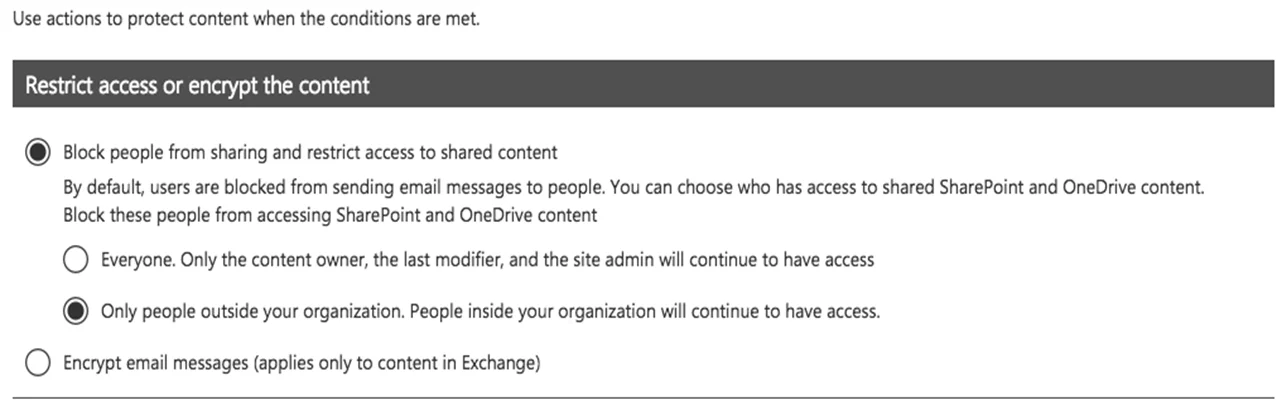
In Microsoft 365, you configure a data loss prevention (DLP) policy named Policy1. Policy1 detects the sharing of United States (US) bank account numbers in email messages and attachments. Policy1 is configured as shown in the exhibit. (Click the Exhibit tab.) You need to ensure that internal users can email documents that contain US bank account numbers to external users who have an email suffix of contoso.com. What should you configure?
Exhibit
Options
- Aan action
- Ba group
- Can exception
- Da condition
How the community answered
(37 responses)- A5% (2)
- B8% (3)
- C73% (27)
- D14% (5)
Explanation
You need to add an exception. In the Advanced Settings of the DLP policy, you can add a rule to configure the Conditions and Actions. There is also an ‘Add Exception’ button. This gives you several options that you can select as the exception. One of the options is ‘except when recipient domain is’. You need to select that option and enter the domain name contoso.com. https://docs.microsoft.com/en-us/office365/securitycompliance/data-loss-prevention- policies#how-dlp-policies-work
Topics
Community Discussion
No community discussion yet for this question.