
MS-102 · Question #375
You have a Microsoft 365 E5 subscription that contains a user named User1. You create an anti-phishing policy named Policy1 that has the following settings: - Include these users, groups and…
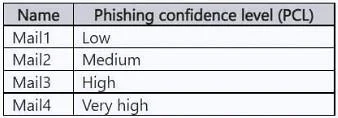
The correct answer is C. Mail2, Mail3, and Mail4 only. More aggressive: Messages that are identified as phishing with a medium or high degree of confidence are treated as if they were identified with a very high degree of confidence. https://learn.microsoft.com/en-us/defender-office-365/anti-phishing-policies-about#advanced…
Question
You have a Microsoft 365 E5 subscription that contains a user named User1. You create an anti-phishing policy named Policy1 that has the following settings:
- Include these users, groups and domains: User1
- Phishing email threshold: 3 - More Aggressive
User1 receives the email messages shown in the following table. Which messages are phishing email?
Exhibit
Options
- AMail4 only
- BMail3 and Mail4 only
- CMail2, Mail3, and Mail4 only
- DMail1, Mail2, Mail3, and Mail4
How the community answered
(39 responses)- A15% (6)
- B5% (2)
- C74% (29)
- D5% (2)
Explanation
More aggressive: Messages that are identified as phishing with a medium or high degree of confidence are treated as if they were identified with a very high degree of confidence. https://learn.microsoft.com/en-us/defender-office-365/anti-phishing-policies-about#advanced- phishing-thresholds-in-anti-phishing-policies-in-microsoft-defender-for-office-365
Topics
Community Discussion
No community discussion yet for this question.