
MS-102 · Question #321
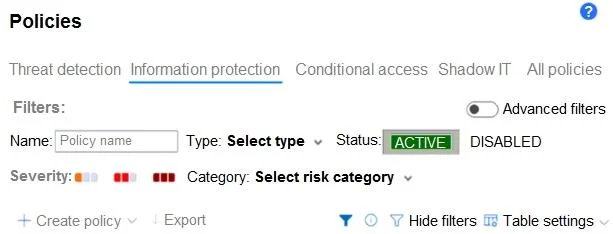
You have a Microsoft 365 E5 subscription and use Microsoft Defender for Cloud Apps. From Policy management, you open Information protection as shown in the following exhibit. Which type of policy…
The correct answer is E. file policy. From the Information protection section in Policy management, you can create a File policy (E). File policies are designed to scan and govern files stored in connected cloud apps, allowing you to inspect content using DLP (Data Loss Prevention) rules, detect sensitive data…
Question
You have a Microsoft 365 E5 subscription and use Microsoft Defender for Cloud Apps. From Policy management, you open Information protection as shown in the following exhibit. Which type of policy can you create?
Exhibit
Options
- Asession policy
- Bactivity policy
- COAuth app policy
- Daccess policy
- Efile policy
How the community answered
(48 responses)- A8% (4)
- B2% (1)
- C4% (2)
- D2% (1)
- E83% (40)
Explanation
From the Information protection section in Policy management, you can create a File policy (E). File policies are designed to scan and govern files stored in connected cloud apps, allowing you to inspect content using DLP (Data Loss Prevention) rules, detect sensitive data (like credit card numbers or PII), and trigger actions such as quarantine, labeling, or user notification. The other policy types are found in different sections: session policies and access policies are under the Conditional Access category, activity policies are under Threat detection, and OAuth app policies are under their own section. Information protection is exclusively for data-at-rest file scanning.
Topics
Community Discussion
No community discussion yet for this question.