
MD-102 · Question #302
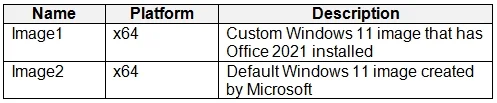
You have a Windows 11 capable device named Device1 that runs the 64-bit version of Windows 10 Enterprise and has Microsoft Office 2019 installed. You have the Windows 11 Enterprise images shown in…
The correct answer is B. lmage2 only. https://learn.microsoft.com/en-us/windows/deployment/windows-10-deployment-scenarios Existing applications are preserved through the process. So, the upgrade process uses the standard Windows installation media image (Install.wim). Custom images aren't needed and can't be used…
Question
You have a Windows 11 capable device named Device1 that runs the 64-bit version of Windows 10 Enterprise and has Microsoft Office 2019 installed. You have the Windows 11 Enterprise images shown in the following table. Which images can be used to perform an in-place upgrade of Device1?
Exhibit
Options
- Aimage1 only
- Blmage2 only
- CImage1 and Image2
How the community answered
(51 responses)- A31% (16)
- B49% (25)
- C20% (10)
Explanation
https://learn.microsoft.com/en-us/windows/deployment/windows-10-deployment-scenarios Existing applications are preserved through the process. So, the upgrade process uses the standard Windows installation media image (Install.wim). Custom images aren't needed and can't be used because the upgrade process is unable to deal with conflicts between apps in the old and new operating system.
Topics
Community Discussion
No community discussion yet for this question.