
MB-820 · Question #118
A company has an on-premises Business Central instance named TEST. The instance uses Windows authorization and a developer services port of 7149 Visual Studio Code is installed on the same server…
The correct answer is A. Change the server Instance parameter to TEST B. Add the port: 7149 parameter. You are working on an on-premises Business Central instance and unable to download symbols for a new AL project. The current configuration in launch.json does not allow you to download symbols, and you need to make corrections. Key Points in the Scenario: Instance name is TEST…
Question
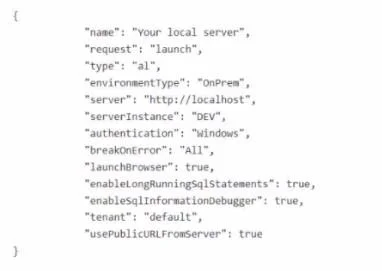
A company has an on-premises Business Central instance named TEST. The instance uses Windows authorization and a developer services port of 7149 Visual Studio Code is installed on the same server. You create a new AL project but cannot download the symbols. The launch json file contains the following code:
You need to download the symbols. Which two actions should you perform? Each correct answer presents part of the solution. NOTE:
Each correct selection is worth one point.
Exhibit
Options
- AChange the server Instance parameter to TEST
- BAdd the port: 7149 parameter.
- CChange the name parameter to TEST.
- DChange the authentication parameter to UserPassword.
- ECheck which server the instance is installed on and replace http//localhost with the correct IP address.
How the community answered
(35 responses)- A71% (25)
- C9% (3)
- D3% (1)
- E17% (6)
Explanation
You are working on an on-premises Business Central instance and unable to download symbols for a new AL project. The current configuration in launch.json does not allow you to download symbols, and you need to make corrections. Key Points in the Scenario: Instance name is TEST. Developer services port is 7149. Windows authentication is being used. Change the server Instance parameter to TEST. The serverInstance parameter must match the name of the Business Central instance, which is TEST in this scenario. You need to modify this to reflect the correct instance name. Add the port: 7149 parameter. Since the developer services are using port 7149, you need to specify this in the launch.json file by adding the port parameter with the value 7149.
Topics
Community Discussion
No community discussion yet for this question.