
MB-820 · Question #113
Drag and Drop Question You plan to run a debug for a client. You extend the Standard Sales - Invoice report to add a new requirement. You create a Report Extension "Ext Standard Sales - Invoice"…
The correct answer is In Visual Studio Code, navigate through the Base Application to locate the Standard Sales - Invoice report.; In Visual Studio Code, locate the Ext Standard Sales - Invoice report extension from your application.; On the Ext Standard Sales - Invoice report extension, search where the NewTotalVATBaseLCY variable is being calculated and set a breakpoint on the line.; Start debugging.; Use the step-into functionality. You've hit your limit · resets 5:20am (America/New_York)
Question
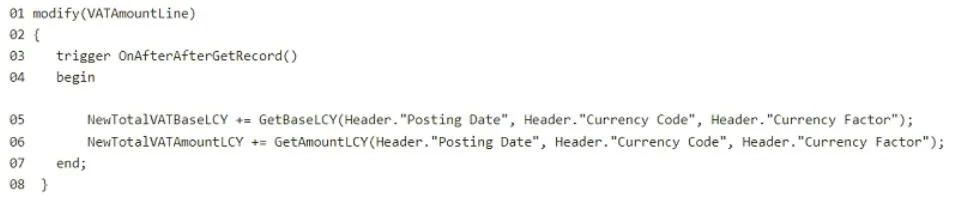
Drag and Drop Question You plan to run a debug for a client. You extend the Standard Sales - Invoice report to add a new requirement. You create a Report Extension "Ext Standard Sales - Invoice" with ID = 50100 and add the following lines of code. (Line numbers are included for reference only.) The client informs you that the value of the NewTotalVATBaseLCY column is incorrect. You need to run a debug to identify the cause. Which four actions should you perform in sequence? To answer, move the appropriate actions from the list of actions to the answer area and arrange them in the correct order. Answer:
Exhibit
Answer Area
Drag items
Correct arrangement
- In Visual Studio Code, navigate through the Base Application to locate the Standard Sales - Invoice report.
- In Visual Studio Code, locate the Ext Standard Sales - Invoice report extension from your application.
- On the Ext Standard Sales - Invoice report extension, search where the NewTotalVATBaseLCY variable is being calculated and set a breakpoint on the line.
- Start debugging.
- Use the step-into functionality.
Explanation
You've hit your limit · resets 5:20am (America/New_York)
Topics
Community Discussion
No community discussion yet for this question.