
MB-800 · Question #98
Drag and Drop Question You are performing actions on posted sales invoices. You need to correct any identified errors. Which actions should you perform? To answer, drag the action buttons to the…
The correct answer is Correct; Cancel; Create Corrective Credit Memo. Business Central: Posted Sales Invoice Corrections This question is from Microsoft Dynamics 365 Business Central and tests knowledge of the three distinct actions available on a posted sales invoice. --- Why This Arrangement Exists Each action produces a different outcome. The…
Question
Exhibit
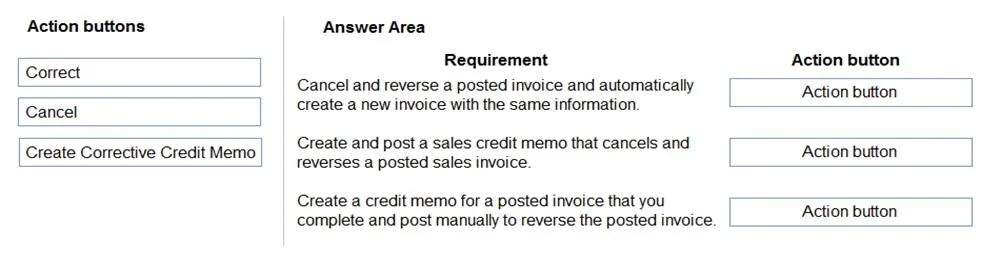
Answer Area
Drag items
Correct arrangement
- Correct
- Cancel
- Create Corrective Credit Memo
Explanation
Business Central: Posted Sales Invoice Corrections
This question is from Microsoft Dynamics 365 Business Central and tests knowledge of the three distinct actions available on a posted sales invoice.
Why This Arrangement Exists
Each action produces a different outcome. The "requirements" (left pane, not shown in your excerpt) describe scenarios - the correct action must match the specific business need.
Item-by-Item Explanation
1. Correct
- What it does: Automatically posts a corrective credit memo to void the original invoice, then opens a new editable draft invoice pre-populated with the original data.
- Use when: You made an error (wrong item, price, quantity) and need to fix and reissue the invoice.
- Key detail: Two things happen at once - the old invoice is cancelled AND a new one is ready to edit. The customer ledger is reversed immediately.
2. Cancel
- What it does: Automatically posts a corrective credit memo to fully void the invoice. No new invoice is created.
- Use when: The invoice should simply be removed entirely - no replacement needed (e.g., customer cancelled the order).
- Key detail: This is a one-click, no-draft operation. It's final and creates no follow-up document to edit.
3. Create Corrective Credit Memo
- What it does: Creates a draft credit memo that you must review and post manually.
- Use when: You need partial credit, want to adjust lines before posting, or need to customize the memo (e.g., partial returns).
- Key detail: Unlike Cancel, the credit memo is NOT automatically posted - it gives you control before it hits the ledger.
Common Mistakes
| Misconception | Reality |
|---|---|
| "Correct and Cancel do the same thing" | Correct creates a new invoice; Cancel does not |
| "Create Corrective Credit Memo is the same as Cancel" | Cancel auto-posts; Credit Memo is a draft you control |
| "Use Cancel to fix a typo" | Use Correct - Cancel leaves you with no invoice at all |
| "Correct keeps the original invoice open" | No - the original is immediately reversed when you click Correct |
Rule of thumb: Fix & reissue → Correct. Void entirely → Cancel. Partial/manual credit → Create Corrective Credit Memo.
Topics
Community Discussion
No community discussion yet for this question.