MB-800 · Question #230
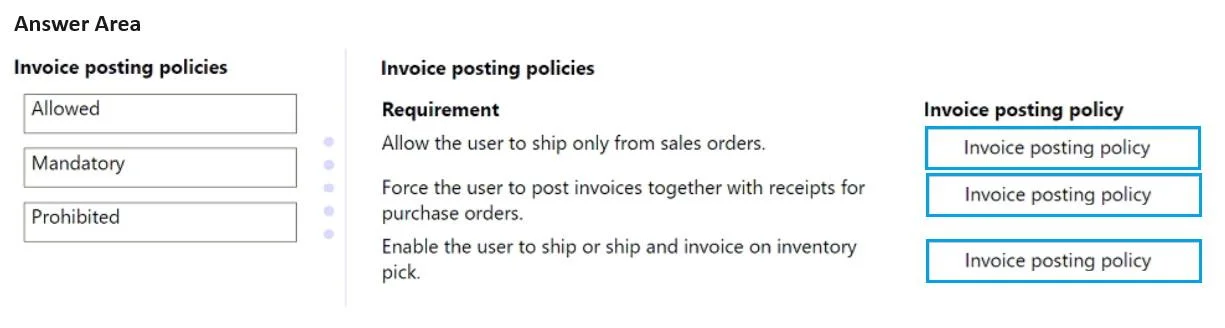
Drag and Drop Question A company uses Dynamics 365 Business Central. The finance manager requires distinct processes for posting sales, purchase invoices, and shipments. You need to configure the…
The correct answer is Prohibited; Mandatory; Allowed. D365 Business Central: Invoice Posting Policy Explained What Is Invoice Posting Policy? In Business Central, the Invoice Posting Policy is a user-level setting that controls whether a user can post invoices when posting documents (sales orders, purchase orders, shipments…
Question
Exhibit
Answer Area
Drag items
Correct arrangement
- Prohibited
- Mandatory
- Allowed
Explanation
D365 Business Central: Invoice Posting Policy Explained
What Is Invoice Posting Policy?
In Business Central, the Invoice Posting Policy is a user-level setting that controls whether a user can post invoices when posting documents (sales orders, purchase orders, shipments, etc.). It enforces separation of duties in financial processes.
The Three Policies
| Policy | What It Means |
|---|---|
| Prohibited | User cannot post invoices at all - only shipments/receipts |
| Mandatory | User must post an invoice every time they post - no shipment-only posting |
| Allowed | User may optionally choose to post with or without an invoice |
Why Each Placement Is Correct
Requirement 1 → Prohibited
Users responsible for posting shipments only (e.g., warehouse staff)
Setting this to Prohibited ensures these users cannot accidentally or intentionally post financial invoice entries. They handle the physical goods movement only. This enforces the "distinct process" the finance manager wants - shipments stay completely separate from invoicing.
Requirement 2 → Mandatory
Users responsible for posting sales or purchase invoices (e.g., AR/AP accountants)
Setting this to Mandatory forces these users to always post a full invoice. They cannot post a partial document (receipt/shipment only) - every posting must include the financial invoice. This prevents incomplete financial records.
Requirement 3 → Allowed
Users who need flexibility across both processes
Allowed is the permissive middle ground - the user chooses at posting time whether to include the invoice. This suits roles that legitimately need to do both tasks without strict enforcement.
Common Mistakes & Misconceptions
- Confusing Allowed with Mandatory: "Allowed" does NOT mean the invoice is required - it means it's optional. Many candidates assume "allowed = must be done."
- Thinking Prohibited restricts all posting: Prohibited only blocks invoice posting - the user can still post shipments and receipts. It does not lock them out of the system.
- Overlooking that this is per-user: This policy is set on the User Setup record, not on the document or posting profile. Each user can have a different policy.
- Assuming the default is Mandatory: The default in Business Central is Allowed, meaning most users have full flexibility unless explicitly restricted.
Key Takeaway
The correct arrangement enforces separation of duties: warehouse/logistics users are Prohibited from invoicing, finance users are Mandatory (always invoice), and flexible roles are Allowed to choose.
Topics
Community Discussion
No community discussion yet for this question.