
MB-700 · Question #131
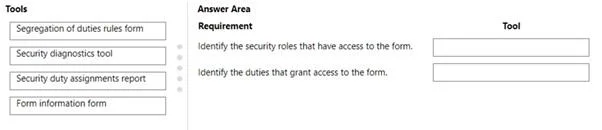
Drag and Drop Question A company audits the security of its Dynamics 365 Supply Chain Management environment. The security administrator must identify the following details: - The security roles…
This question tests knowledge of Dynamics 365 Finance & Operations (Supply Chain Management) built-in security auditing tools used to trace access at both the role level and duty level for specific forms.
Question
Exhibit
Explanation
This question tests knowledge of Dynamics 365 Finance & Operations (Supply Chain Management) built-in security auditing tools used to trace access at both the role level and duty level for specific forms.
Approach. Security Diagnostics (System Administration > Inquiries > Security > Security Diagnostics) is the correct tool for identifying which security roles have access to a specific form such as the Budget Plan form - it allows an admin to query by a specific menu item or form and returns all roles that grant access to it. Security Duty Assignments is the correct tool for the second requirement: it surfaces the duties that are bundled into roles and shows which duties provide access to specific entry points, allowing the admin to trace the duty-level grants for the budget plan form. Together, these two tools give a complete picture: roles (via Security Diagnostics) and the underlying duties within those roles (via Security Duty Assignments).
Concept tested. Dynamics 365 Finance & Operations security audit toolset - specifically knowing the difference between Security Diagnostics (role-level access tracing per form/object) and Security Duty Assignments (duty-level access mapping), and when to use each during a security audit.
Reference. Microsoft Learn: 'Security architecture' and 'Role-based security' in Dynamics 365 Finance - System Administration > Inquiries > Security
Topics
Community Discussion
No community discussion yet for this question.