
MB-700 · Question #126
Drag and Drop Question A company plans to use Dynamics 365 finance and operations apps. Code builds for new development must follow Microsoft's recommendations by using supported tools. Virtual…
This question tests knowledge of Microsoft's recommended ALM (Application Lifecycle Management) toolchain for Dynamics 365 Finance and Operations development, specifically which VM environment serves each role in the development pipeline.
Question
Exhibit
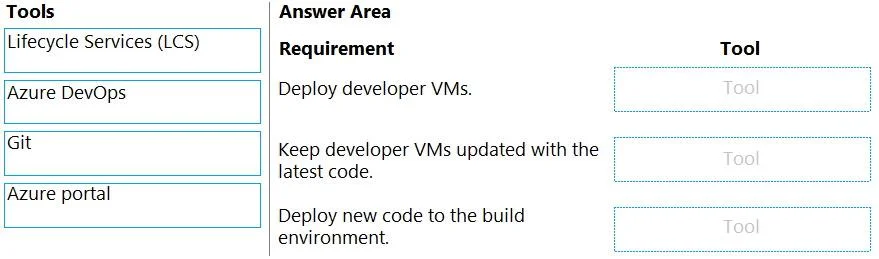
Explanation
This question tests knowledge of Microsoft's recommended ALM (Application Lifecycle Management) toolchain for Dynamics 365 Finance and Operations development, specifically which VM environment serves each role in the development pipeline.
Approach. Microsoft recommends Tier-1 VMs (cloud-hosted environments) for individual code development - these are single-box environments containing all D365 F&O components, giving developers an isolated workspace to write, compile, and locally test X++ code. For central merging, a dedicated Build VM integrated with Azure DevOps is the recommended approach: developers push branches to Azure DevOps source control, and the Build VM runs automated pipelines that compile code, resolve merge conflicts, and produce deployable packages. This separation of concerns mirrors standard CI/CD practices - developer VMs for authoring, a centralized build agent for integration - and is explicitly documented in Microsoft's Dynamics 365 F&O ALM guidance.
Concept tested. Dynamics 365 Finance and Operations ALM architecture: the role of Tier-1 cloud-hosted (developer) VMs versus the dedicated Build VM in Azure DevOps for centralized code integration and continuous integration pipelines.
Reference. Microsoft Learn - 'Development and build environments' in Dynamics 365 F&O: https://learn.microsoft.com/en-us/dynamics365/fin-ops-core/dev-itpro/dev-tools/development-tools-overview
Topics
Community Discussion
No community discussion yet for this question.