
MB-500 · Question #57
A company has an extension that makes changes to a base form. You need to identify all extension changes made to the base form. What are two possible ways to achieve the goal? Each correct answer…
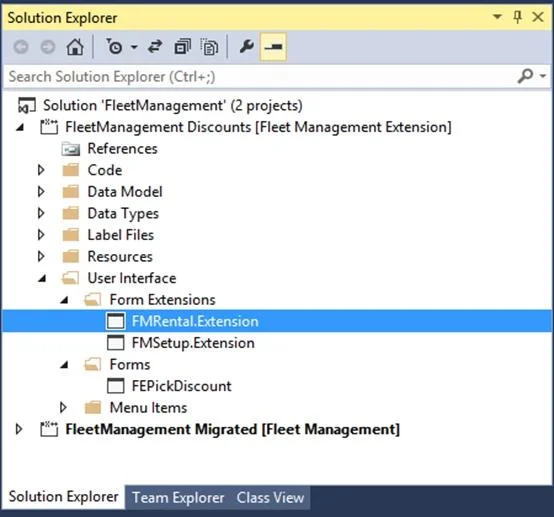
The correct answer is C. Right-click the base form and select view references. D. In the search bar on the form extension element, enter the text e. C: Customization and Extension D: Example: Navigate to FMRental.Extension in the Tree Designer 1. In the Visual Studio, in Solution Explorer, in the FleetManagement Discounts project, expand User Interface > Form Extensions. The FMRental.Extension element is an extension…
Question
Exhibit
Options
- AIn the search bar on the form extension element, enter the text c:.
- BIn the search bar on the base form, enter the text e:.
- CRight-click the base form and select view references.
- DIn the search bar on the form extension element, enter the text e:.
- EIn the search bar on the base form, enter the text c:.
How the community answered
(35 responses)- A6% (2)
- B11% (4)
- C80% (28)
- E3% (1)
Explanation
C: Customization and Extension D: Example: Navigate to FMRental.Extension in the Tree Designer 1. In the Visual Studio, in Solution Explorer, in the FleetManagement Discounts project, expand User Interface > Form Extensions. The FMRental.Extension element is an extension element that extends the functionality of the FMRental form by adding two new data sources and a new tab control. 2. In Solution Explorer, double-click FMRental.Extension to open the designer. 3. In the designer's search box, type 'e:' as shown in the image below. This filters the current designer to only show nodes that belong to the current extension. https://docs.microsoft.com/en-us/dynamics365/fin-ops-core/dev-itpro/extensibility/customize- model-elements-extensions
Topics
Community Discussion
No community discussion yet for this question.