
MB-500 · Question #380
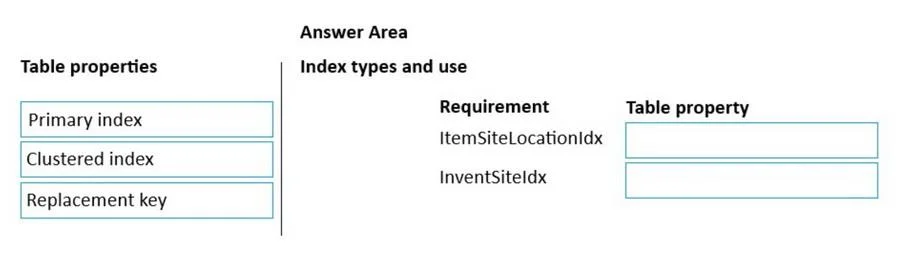
Drag and Drop Question A company uses Dynamics 365 Supply Chain Management. You create a new table that will be used to initialize default values. The table contains the ItemId, InventSiteId, end…
The correct answer is Primary index; Clustered index. Explanation Context In Dynamics 365 SCM (X++), a table has three key index-related properties you can set at the table level (not the index level): | Property | Purpose | |---|---| | Primary index | Declares which unique index identifies each record uniquely | | Clustered index…
Question
Exhibit
Answer Area
Drag items
Correct arrangement
- Primary index
- Clustered index
Explanation
Explanation
Context
In Dynamics 365 SCM (X++), a table has three key index-related properties you can set at the table level (not the index level):
| Property | Purpose |
|---|---|
| Primary index | Declares which unique index identifies each record uniquely |
| Clustered index | Controls the physical storage order of rows on disk |
| Replacement key | Provides a user-friendly natural key for lookups/forms |
Why Each Property Goes Where
1. ItemSiteLocationIdx → Primary index
The business rule states: one item can appear on many sites, but only one location per site. This means the combination of (ItemId, InventSiteId) must be unique across the table.
ItemSiteLocationIdx enforces that uniqueness constraint - it is the natural candidate for Primary index, which in X++ must point to a unique index. This tells the AOS and database layer "this index uniquely identifies a record."
2. InventSiteIdx → Clustered index
The requirement explicitly says this index exists "to order the items per site." A Clustered index controls the physical row ordering on disk. Setting InventSiteIdx as the clustered index means rows are stored in site order, making site-based queries fast without a sort operation.
3. Replacement key → Not used
Replacement key is for surfacing a human-readable identifier in form lookups. Neither requirement involves UI display or natural key substitution, so it is a deliberate distractor.
Common Mistakes
- Swapping Primary and Clustered: Candidates often set
InventSiteIdxas Primary index - wrong, because an ordering-only index is not necessarily unique, and Primary index requires a unique index. - Using Replacement key: It sounds authoritative, but it only affects form/lookup presentation, not data integrity or storage order.
- Confusing index-level vs. table-level properties:
Allow DuplicatesandEnabledare properties on the index itself, not what this question asks about. The question asks about table-level property settings.
Topics
Community Discussion
No community discussion yet for this question.