
MB-500 · Question #344
A company uses Dynamics 365 finance and operations apps. A customer wants to ensure future customizations or application upgrades do not interfere with or interrupt business process steps. The…
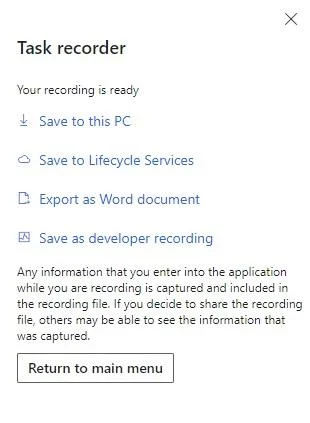
The correct answer is B. Save as developer recording C. Export as Word document D. Save to Lifecycle Services. Development and administration for finance and operations apps, Task recorder resources Options after a recording is completed After you click Stop to end your recording session, several options are shown so that you can save the files that are related to the completed…
Question
Exhibit
Options
- AGenerate Test Execution files only
- BSave as developer recording
- CExport as Word document
- DSave to Lifecycle Services
- ECreate derived test case
How the community answered
(37 responses)- A3% (1)
- B86% (32)
- E11% (4)
Explanation
Development and administration for finance and operations apps, Task recorder resources Options after a recording is completed After you click Stop to end your recording session, several options are shown so that you can save the files that are related to the completed recording. Select Save to this PC, and save the task recording package to your desktop. You will use this file later. B: Save as developer recording The raw recording file (developer recording) is useful for developer scenarios, such as test code generation and scenarios where RSAT is used. C: Export as Word document The Microsoft Word document for your recording contains the recorded steps as well as any screenshots that were captured. D: Save to Lifecycle Services (LCS) When you save your recording to an LCS library, it's published on the specified business process in a BPM library. If the selected LCS library is set as a Help library, you will be able to find the task guide for the recording by searching the Help menu. To be able to save a recording to an LCS library, the user must be in the Microsoft Entra tenant that the environment was deployed from. https://learn.microsoft.com/en-us/dynamics365/fin-ops-core/dev-itpro/user-interface/task-recorder
Topics
Community Discussion
No community discussion yet for this question.