
MB-500 · Question #307
Case study 4 - ADatum Corporation Background ADatum Corporation is a market leader in the design and distribution of innovative aluminum systems. The company provides services to the architectural…
The correct answer is B. Event Grid C. Service Bus Topic. Scenario: Requirements. Business systems After a user named UserA posts a packing slip for a sales order, customers must be informed of the product delivery in real-time. This information is provided using business events. Power Automate Not straightforward. Service Bus Queue…
Question
Exhibit
Options
- APower Automate
- BEvent Grid
- CService Bus Topic
- DService Bus Queue
How the community answered
(43 responses)- A14% (6)
- B81% (35)
- D5% (2)
Explanation
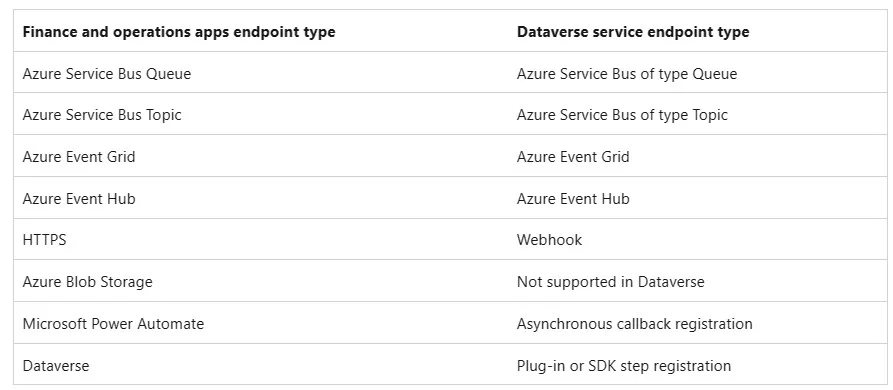
Scenario: Requirements. Business systems After a user named UserA posts a packing slip for a sales order, customers must be informed of the product delivery in real-time. This information is provided using business events. * Power Automate Not straightforward. * Service Bus Queue The events must be sent immediately, not queed. * Power Automate A finance and operations app doesn't provision the endpoints. The endpoints must be created separately and provided to the app. The app then sends events to the endpoints that are provided. Customers might incur additional costs if they use these endpoints in their Azure Subscribing to finance and operations apps events from Dataverse After the Microsoft Power Platform integration is enabled, you can subscribe to finance and operations apps business events and data events from Dataverse. When the Microsoft Power Platform integration is enabled for a finance and operations apps environment, endpoints that are created for business events are synced with the linked Microsoft Power Platform environment for endpoint types that are supported in Dataverse. The endpoints can then be used in Microsoft Power Platform. When the endpoints are synced, business events that are sent from finance and operations apps are proxied through Dataverse to the endpoint. The following table shows the mapping between the finance and operations apps and Dataverse implementations of the endpoints. Setup D365 Business Events Create an Business Event Endpoint Before we can setup our event, we need to first setup an 'Endpoint' which is where our business event setup will be sent to. Open the Endpoints tab, and click 'New' Specify the endpoint type. There are many different types of endpoints that the system supports, including sending the messages to Azure, Microsoft Power Automate, and a custom https://learn.microsoft.com/en-us/dynamics365/fin-ops-core/dev-itpro/business-events/managing- business-event-endpoints https://dynamics365musings.com/how-to-setup-d365-business-events-part-1/
Topics
Community Discussion
No community discussion yet for this question.