
MB-500 · Question #265
Drag and Drop Question A company is creating custom functionality to manage rentals by using Dynamics 365 Supply Chain Management. You need to create menu items for the following business processes…
The correct answer is Display; Output; Action. D365 Supply Chain Management - Menu Item Types Definitions First | Type | Purpose | |------|---------| | Display | Opens a form for viewing or entering data interactively | | Output | Runs a report or generates a printed/list output | | Action | Executes a class or batch job…
Question
Exhibit
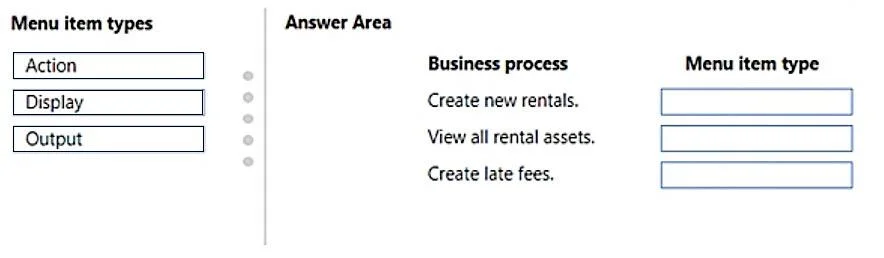
Answer Area
Drag items
Correct arrangement
- Display
- Output
- Action
Explanation
D365 Supply Chain Management - Menu Item Types
Definitions First
| Type | Purpose |
|---|---|
| Display | Opens a form for viewing or entering data interactively |
| Output | Runs a report or generates a printed/list output |
| Action | Executes a class or batch job - runs business logic/code |
Placement Breakdown
1. Create new rental in a form grid → Display
A form grid is a standard AX/D365 form control. Anytime a user navigates to a form - whether to create, read, or edit records - you use a Display menu item. The name is misleading to newcomers; "Display" does not mean read-only. It simply means "open a form."
Common mistake: Thinking "Display" means view-only and that you need a different type for creation. Display handles all form-based interaction.
2. View a list of all rental assets in an interactive form → Output
"View a list" is the keyword here. Even though the word "interactive" is used, this describes producing a structured list/report of records - which maps to an Output menu item. Output menu items run report classes (SSRS or query-based) that render a list of data.
Common mistake: Assuming "interactive form" means a Display menu item. In D365 exam context, a "list of all [records]" is report output, not a transactional form.
3. Create late fee charges once a week based on unreturned items → Action
"Once a week" is the signal - this is a scheduled or on-demand batch process. It runs business logic (a class/runnable class) to process data and generate charges. Action menu items are used to invoke classes, jobs, and batch tasks - not to open forms or reports.
Common mistake: Using Display here because it involves "creating" records. The creation is done programmatically by the class, not by a user typing into a form.
Quick Memory Rule
- User types into a form → Display
- User views a printed/listed report → Output
- System/user runs a process or batch job → Action
Topics
Community Discussion
No community discussion yet for this question.