
MB-500 · Question #244
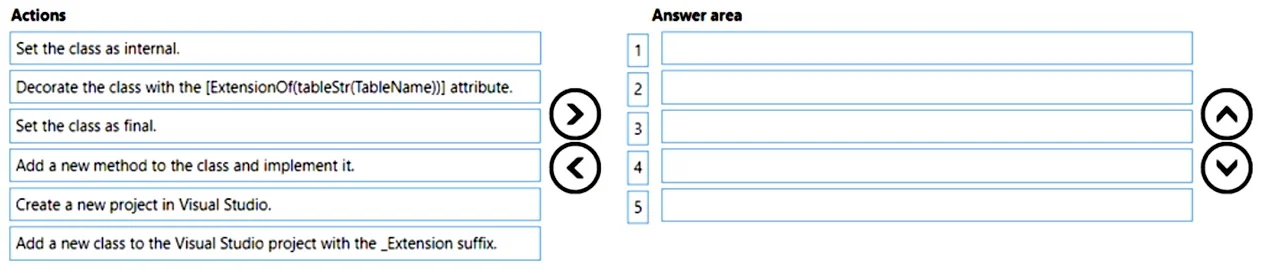
Drag and Drop Question A company uses Dynamics 365 Finance. You create a new extension for a standard table. You need to add a new method in the extension. Which five actions should you perform in…
The correct answer is Create a new project in Visual Studio.; Add a new class to the Visual Studio project with the _Extension suffix.; Set the class as final.; Decorate the class with the [ExtensionOf(tableOrTableName)] attribute.; Add a new method to the class and implement it. Dynamics 365 Finance: Adding a Method to a Table Extension The Correct Sequence Explained This question tests your knowledge of the Chain of Command (CoC) and class extension pattern in X++ development. --- Step-by-Step Breakdown 1. Create a new project in Visual Studio Every…
Question
Exhibit
Answer Area
Drag items
Correct arrangement
- Create a new project in Visual Studio.
- Add a new class to the Visual Studio project with the _Extension suffix.
- Set the class as final.
- Decorate the class with the [ExtensionOf(tableOrTableName)] attribute.
- Add a new method to the class and implement it.
Explanation
Dynamics 365 Finance: Adding a Method to a Table Extension
The Correct Sequence Explained
This question tests your knowledge of the Chain of Command (CoC) and class extension pattern in X++ development.
Step-by-Step Breakdown
1. Create a new project in Visual Studio
Every D365 Finance development artifact lives inside a Visual Studio project tied to a model. You must have a project before you can add any artifacts. This is always the first step - there is no other container for your work.
2. Add a new class to the Visual Studio project with the _Extension suffix
The naming convention TableName_Extension is not just cosmetic - it is the X++ compiler's signal that this is an extension class. Without the _Extension suffix, the class is treated as a regular class, not a table extension. The suffix must be added at creation time because it defines what the class is.
3. Set the class as final
Extension classes in X++ must be declared final. This prevents anyone from inheriting from your extension class, which is required by the extension model. A non-final extension class will produce a compiler error. This must be done before wiring up the [ExtensionOf] attribute, as the class declaration itself needs to be correct first.
4. Decorate the class with the [ExtensionOf(tableStr(TableName))] attribute
This attribute is what binds your extension class to the target table. Without it, the class has no connection to the table you want to extend. It goes after final because you are completing the class declaration before configuring its behavior/metadata.
5. Add a new method to the class and implement it
Only once the class is properly declared (final), properly attributed ([ExtensionOf]), and recognized by the compiler as a valid extension can you add and implement your method. Logic comes last.
Why "Set the class as internal" is excluded
internal restricts visibility to the current model only. While valid in some scenarios, it is not required for table extensions and was included as a distractor. Extensions are typically public by default.
Common Mistakes
| Mistake | Why it's wrong |
|---|---|
Skipping final | Compiler error - extension classes must be final |
Adding the method before the [ExtensionOf] attribute | The class isn't connected to anything yet; misleading and error-prone |
Using internal instead of final | Confuses access modifier (internal) with inheritance modifier (final) - they are unrelated |
No _Extension suffix | Compiler won't treat it as an extension class |
Mental Model
Think of it as outside-in: first build the shell (project → class → modifiers → attributes), then fill in the content (method). You cannot meaningfully implement behavior before the framework knows what table you're extending.
Topics
Community Discussion
No community discussion yet for this question.