
MB-500 · Question #229
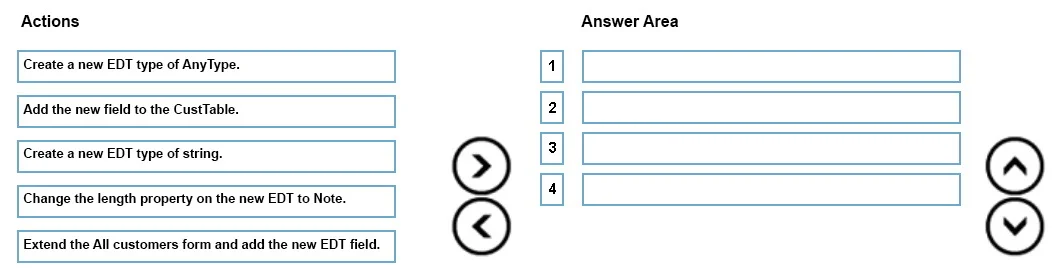
Drag and Drop Question A business needs a free-text field on the All customers form to enter notes about shipment requests. The field must allow users to enter a large number of characters. You need…
The correct answer is Create a new EDT type of string.; Change the length property on the new EDT to Note.; Add the new field to the CustTable.; Extend the All customers form and add the new EDT field. Explanation: Creating an EDT for Free-Text Shipment Notes in D365 F&O This question tests your knowledge of the correct development sequence in Microsoft Dynamics 365 Finance & Operations (X++) when adding a large-text field using an Extended Data Type (EDT). --- Why This…
Question
Exhibit
Answer Area
Drag items
Correct arrangement
- Create a new EDT type of string.
- Change the length property on the new EDT to Note.
- Add the new field to the CustTable.
- Extend the All customers form and add the new EDT field.
Explanation
Explanation: Creating an EDT for Free-Text Shipment Notes in D365 F&O
This question tests your knowledge of the correct development sequence in Microsoft Dynamics 365 Finance & Operations (X++) when adding a large-text field using an Extended Data Type (EDT).
Why This Order?
The sequence follows a foundational rule: define the data type → configure it → store it in the database → expose it on the UI. You cannot skip steps or reverse them without breaking dependencies.
Step-by-Step Breakdown
1. Create a new EDT type of string
You must start by defining the EDT because everything else depends on it. The type must be string because the field stores text characters. string EDTs can be configured with a length property, which is exactly what the next step requires.
Why not
AnyType?AnyTypeis a dynamic/variant type used for scenarios where the data type isn't known at compile time (e.g., generic containers). It cannot be configured with a string length property, so it cannot fulfill the "large number of characters" requirement. This is the most common wrong answer here.
2. Change the length property on the new EDT to Note
After creating the EDT, you configure it before attaching it to anything. Setting the length to Note (a predefined D365 F&O size value equivalent to ~32,000 characters) enables the large-text capacity. You do this before adding it to the table so the table field inherits the correct size immediately.
Common mistake: Some assume you set the length after adding it to the table. But EDT configuration should happen at the type level first - the table field inherits properties from the EDT, not the other way around.
3. Add the new field to the CustTable
The "All Customers" form is backed by the CustTable table. Before the field can appear on the form, it must exist in the underlying data model. You add the EDT as a new field on CustTable, which creates the corresponding database column.
Why before the form? Forms display data from tables. A form control bound to a field that doesn't exist in the table will fail. The table is the data source - it must come first.
4. Extend the All Customers form and add the new EDT field
Finally, you extend the CustTable form (using D365's extension model, not direct modification) and drag/bind the new CustTable field onto it. At this point, all prerequisites exist: the EDT is defined, the table has the column, so the form control has something valid to bind to.
Why extend rather than modify? D365 F&O uses an extension-based customization model to preserve upgradability. Direct modification of base objects is not recommended practice.
Summary Table
| Step | Action | Reason |
|---|---|---|
| 1 | Create EDT of string | Defines the reusable type; string supports length config |
| 2 | Set length to Note | Configures the EDT for large text before it's used anywhere |
| 3 | Add field to CustTable | Establishes the data model backing the form |
| 4 | Extend form, add field | Exposes the stored data to the user interface |
Key Misconceptions to Avoid
AnyTypeis not for text fields - it's for polymorphic scenarios, not user-facing string input.- You configure the EDT before using it - don't add it to the table and then try to fix properties.
- Table before form - always model the data layer before the presentation layer.
Topics
Community Discussion
No community discussion yet for this question.