Case Study 1 - Wide World Importers Background Wide World Importers sell office supplies, furniture, and fittings to their customers across the United States. The company has the following…
The correct answer is asynchronous; synchronous; synchronous; asynchronous. Integration Strategies: Synchronous vs Asynchronous The Four Requirements (in order) Based on the case study, the four integration requirements being matched are: | # | Requirement | Answer | |---|---|---| | 1 | Product data for the web portal integrated as periodic batches |…
Implement data and application integration
Question
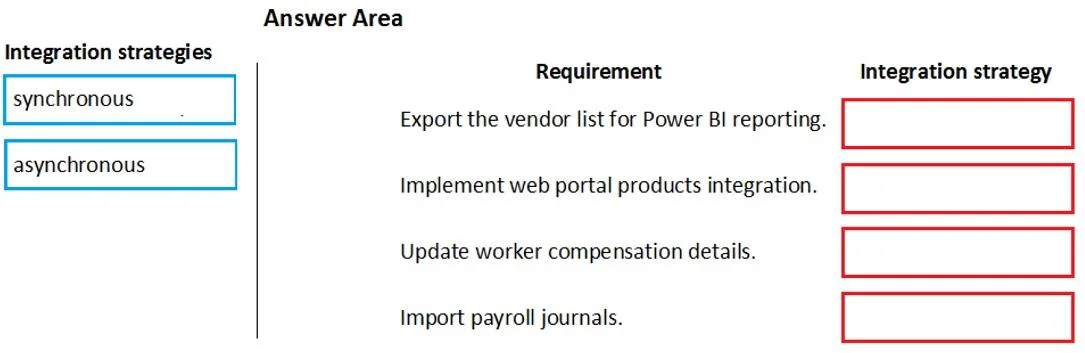
Case Study 1 - Wide World Importers Background Wide World Importers sell office supplies, furniture, and fittings to their customers across the United States. The company has the following locations: a retail store in Seattle a warehouse in Seattle a customer support and call center in Atlanta a team of field workers that provide furniture installation services at customer sites. Wide World Importers plans to implement Dynamics 365 Finance and Microsoft Azure cloud platform features. Current environment Customers may place orders by email, phone, or by using the company's website. The company authorizes and processes credit card transactions by using a web-based application. Customer, inventory, supplier, and other master and transactional data is stored in a legacy database. The company collects feedback from customers by phone or a form on the company's website and maintains the data in a Microsoft Excel workbook. Wide World Importers runs on-premises applications to manage payroll and workers compensation. The company has a set of Microsoft Power BI dashboards that present data from a reporting database. The company creates a Lifecycle Services (LCS) implementation project and completes Dynamics 365 Finance onboarding. The company maintains production, quality assurance (QA), development, user acceptance testing (UAT), and build environments. Requirements General You must configure a cloud-based Dynamics 365 Finance development environment and enable code extension that support updates. You must configure version control and a Build environment. You must migrate all legacy data to the new system. You must implement best practices for X++ coding, the data model, caching, and security. All new code must be unit tested in a development environment and then validated by the QA team before code is added to source control. Business processes You must configure vendor trade agreements. Products must be shipped directly from suppliers to customers depending on customer location to save indirect costs. You must collect customer feedback on products shipped directly from vendors. You must deploy code to a UAT environment for testing before deploying code to production. You must validate all entries for the purchase order creation form. You must develop a web portal that allows customers to browse products, place orders, and check order status. Product data for the web portal must be integrated as periodic batches. Business systems You must install and configure a third-party solution for credit card processing within Dynamics 365 Finance. The third-party company will provide a deployable package. The workers compensation application must be able to call an API to update worker compensation details in Dynamics 365 Finance. You must develop a process to import payroll journals into the system. You must configure the warehouse mobile device portal for warehouse operations. You must install a third-party solution to support web portal integration. The solution is supplied as a source code model file. Vendor exclusion list You must develop a new solution to maintain a Vendor exclusion list for each customer and item combination. The solution must meet the following requirements: Isolate all new vendor exclusion codes as a new assembly by creating a table named VendExclusions. Create an index for the table named PrimaryIdx that uses the following fields: CustAccount, ItemId, VendAccount. Ensure that users can open the Vendor Exclusion list report from the customer master form. The list must display the customer account, Item ID, and Vendor account fields. Implement the Excel integration for the Vendor Exclusion List form. Provide functionality to periodically export the Vendor exclusion list to prepare reports by using standard reporting capabilities of Dynamics 365 Unified Operations. Develop necessary security permissions to view and maintain the new Vendor exclusion list functionality and reporting. Users with maintain rights will be able create, update, and delete the exclusion list. Permissions must be assigned to security roles to match company security model. Maintain referential integrity with other tables. Users must be presented with a warning message before a direct delivery purchase order is created for a vendor in exclusion list. Sales managers must be alerted when a new exclusion record is added to the system. Security You must implement the record level audit feature to identify the users who created the record. Grant specific users rights to maintain the vendor exclusion list by using Excel. You must implement validation to check whether a proposed direct delivery purchase order vendor is on the exclusion list for the customer and product combination. Issues User1 is not able to access many features in the system. You must provide User1 administrator rights. A sales manager suspects a data-related issue in the vendor exclusion list. User1 must identify the user who created the referenced exclusion records. Developer2 joins the company and does not have access to a development environment or source control. User2 reports performance issues when they generate direct delivery purchase orders after current updates are applied. User2 reports that they cannot access new functionality and reports. Drag and Drop Question You need to implement the company's integration requirements. Which integration strategies should you use? To answer, drag the appropriate integration strategies to the correct requirements. Each integration strategy may be used once, more than once, or not at all. You may need to drag the split bar between panes or scroll to view content. NOTE: Each correct selection is worth one point. Answer:
Exhibit
Answer Area
Drag items
synchronousasynchronous
Correct arrangement
asynchronous
synchronous
synchronous
asynchronous
Explanation
Integration Strategies: Synchronous vs Asynchronous
The Four Requirements (in order)
Based on the case study, the four integration requirements being matched are:
#
Requirement
Answer
1
Product data for the web portal integrated as periodic batches
asynchronous
2
Workers compensation app calls an API to update worker comp details in D365 Finance
synchronous
3
Credit card transaction authorization and processing
synchronous
4
Import payroll journals into the system
asynchronous
Item-by-Item Explanation
1. Web portal product data → asynchronous
The requirement explicitly states "periodic batches." Batch/scheduled integrations are the textbook definition of asynchronous - the sender does not wait for a real-time response. The web portal can tolerate slightly stale product data (prices, descriptions) updated on a schedule. There is no need to block and wait for confirmation before continuing.
2. Workers compensation API call → synchronous
The requirement says the external payroll/workers-comp application calls an API to push updates into D365 Finance. An API call by nature implies a request/response pattern - the calling system sends data and waits for an immediate acknowledgment (success/failure). If the update fails, the calling system needs to know right away so it can handle the error. This is the classic synchronous integration pattern.
3. Credit card processing → synchronous
Credit card authorization is inherently real-time. The customer (or order process) must receive an immediate approve/decline before the transaction can proceed. You cannot batch credit card authorizations and process them later - the result gates the next step. Synchronous is the only viable option here.
4. Payroll journal import → asynchronous
Payroll journals are imported on a schedule (e.g., per pay period). The source payroll application does not need to wait for D365 to finish importing before it continues. The data can be queued and processed in the background. This is a batch/file-based integration - inherently asynchronous.
Common Mistakes & Misconceptions
Confusing "API" with synchronous automatically - while most API calls are synchronous, message queue APIs can be async. Here, the workers-comp calling D365's API and waiting for a response is the synchronous indicator.
Assuming all imports are asynchronous - if an import requires immediate validation feedback (e.g., real-time data validation), it could be synchronous. The word "periodic" is the key signal for async here.
Overlooking the batch keyword - "periodic batches" is a dead giveaway for asynchronous. If the question says "real-time," "immediate," or involves a blocking response, think synchronous.
Core rule: If the process must wait for a response before continuing, it's synchronous. If it can fire and forget or process on a schedule, it's asynchronous.
Topics
#synchronous integration#asynchronous integration#integration patterns#batch vs real-time