
MB-500 · Question #116
Hotspot Question A company has a cloud-based Dynamics 365 Finance environment and uses an e-commerce website for retail operations. The website has business to business (B2B) capabilities. The…
The correct answer is Data management framework's package API; Recurring integration API. Dynamics 365 Finance Integration Tools - Exam Explanation Understanding the Requirements The question presents two distinct needs: | # | Requirement | Correct Tool | |---|-------------|--------------| | 1 | Process thousands of transactions per batch run (high-volume bulk data)…
Question
Exhibit
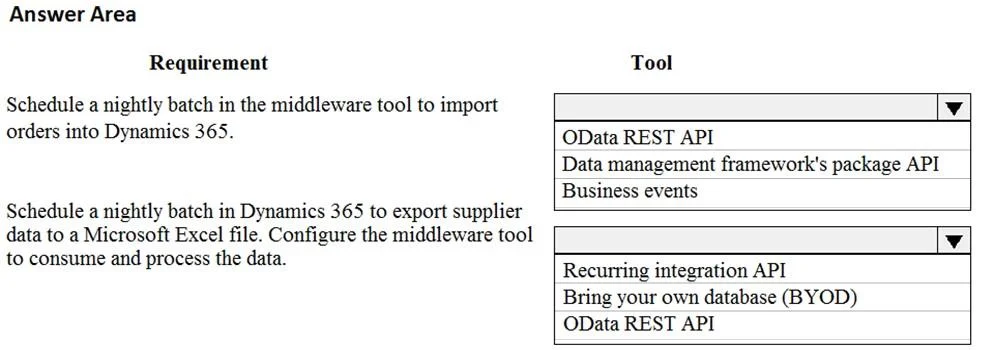
Answer Area
Drag items
Correct arrangement
- Data management framework's package API
- Recurring integration API
Explanation
Dynamics 365 Finance Integration Tools - Exam Explanation
Understanding the Requirements
The question presents two distinct needs:
| # | Requirement | Correct Tool |
|---|---|---|
| 1 | Process thousands of transactions per batch run (high-volume bulk data) | Data management framework's package API |
| 2 | Automate the batch job to run on a schedule (recurring execution) | Recurring integration API |
Why Each Tool Fits
1. Data management framework's package API → Bulk volume processing
This API is built specifically for high-throughput data import/export in Dynamics 365 F&O. It works by packaging data entities into compressed files and pushing them through the data management framework, which can handle thousands of records per run efficiently. It is the correct choice whenever the requirement mentions large transaction volumes, bulk operations, or data migration.
2. Recurring integration API → Scheduling/automation
This API sits on top of the data management framework and adds scheduling capability. It lets external systems (like a middleware tool) enqueue data jobs that execute automatically on a defined interval - exactly what "automate some operations" via a batch job means. It handles the when and trigger side of batch automation.
Why the Other Options Are Wrong
- OData REST API - designed for real-time, record-by-record CRUD operations. Too slow and inefficient for thousands of transactions; not batch-oriented.
- Business Events - outbound event notifications fired from D365 when something happens. Useful for EDA patterns, not for ingesting or scheduling bulk data.
- BYOD (Bring Your Own Database) - read-only export to an external Azure SQL DB for reporting/analytics. It does not process inbound transactions and has no scheduling or import capability.
Common Misconceptions
- Confusing OData with bulk processing - OData is the go-to for simple integrations, but it bottlenecks at volume. The package API is the correct high-volume answer.
- Thinking Recurring integration API alone is enough - it schedules jobs but relies on the data management framework's package API to actually handle the data payload. They are complementary.
- Selecting Business Events for automation - business events are reactive (triggered by D365 actions outbound), not a tool for scheduling inbound batch jobs.
Topics
Community Discussion
No community discussion yet for this question.