
MB-330 · Question #505
Drag and Drop Question A company is implementing Dynamics 365 Supply Chain Management. The company has more than 5,000 employees who will use the Warehouse Management mobile app in locations across…
The correct answer is Microsoft Intune; JSON file. Explanation: Deploying the Warehouse Management Mobile App The Core Problem 5,000+ devices, limited IT staff, weekend deadline. The challenge has two distinct sub-problems: (1) how to push the app to all devices at scale, and (2) how to configure the app once installed…
Question
Exhibit
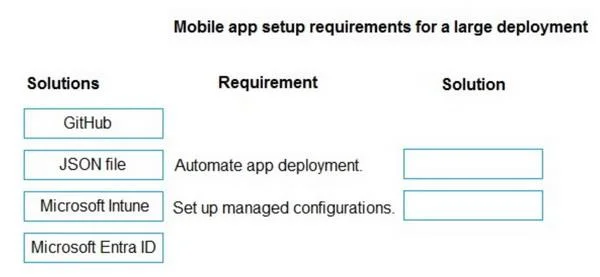
Answer Area
Drag items
Correct arrangement
- Microsoft Intune
- JSON file
Explanation
Explanation: Deploying the Warehouse Management Mobile App
The Core Problem
5,000+ devices, limited IT staff, weekend deadline. The challenge has two distinct sub-problems: (1) how to push the app to all devices at scale, and (2) how to configure the app once installed.
Correct Arrangement
Slot 1: Microsoft Intune - Mass Deployment
Why: Microsoft Intune is an MDM (Mobile Device Management) solution that allows IT to push apps to thousands of enrolled devices remotely, without physically touching each one. With limited IT staff and 5,000+ devices, manual installation is impossible. Intune automates the app push during off-hours (the weekend), requiring zero physical intervention per device.
- Intune is the standard enterprise mechanism for deploying the Dynamics 365 Warehouse Management mobile app at scale
- Devices only need to be enrolled in Intune; the app installs automatically
Slot 2: JSON file - App Configuration
Why: The Warehouse Management mobile app reads a connection.json file to pre-configure connection settings (server URL, company, etc.). When deploying via Intune, you can push this JSON configuration policy alongside the app, so the app is already configured when it opens - users don't need to manually enter server details.
- This eliminates per-device manual setup, which again compensates for limited IT staff
Why the Other Options Are Wrong
| Item | Why It Doesn't Fit |
|---|---|
| GitHub | A code repository - not an enterprise app deployment tool |
| Microsoft Entra ID | Handles identity/authentication, not app deployment. Devices may use Entra ID for enrollment, but Intune is the deployment mechanism |
Common Misconceptions
- Entra ID vs. Intune confusion: Students often pick Entra ID because it's Microsoft and involves device management - but Entra ID manages identities, Intune manages devices and apps
- Underestimating the JSON file: It's not just a "config file" - it's the official mechanism the Warehouse Management app uses to receive its connection settings, especially critical in automated deployments where no user input is expected
The pattern to remember: Intune = deploy, JSON file = configure.
Topics
Community Discussion
No community discussion yet for this question.