Question
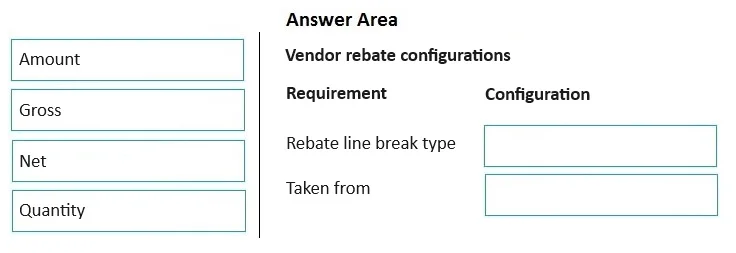
Case Study 7 - Coho Vineyard & Winery Background Coho Vineyard & Winery is a parent company that has two subsidiaries: Coho Vineyard and Coho Winery. Coho Vineyard is based in Medford, Oregon. The vineyard grows the grapes and then produces and bottles the wine. Coho Winery, based in Grants Pass, Oregon, distributes packaged wine to businesses and consumers. The winery sells imported cheese and olive oil in addition to the wines. Current environment. Technology landscape Coho Vineyard & Winery requires financial reporting from both Coho Vineyard and Coho Winery. The parent company consolidates financials in a third-party tool. Coho Winery currently manages inventory and financials on spreadsheets separately from the parent company. Current environment. Inventory and warehousing - The entire warehouse is temperature controlled. A refrigerated section of the warehouse is used for items that require colder storage. - The items do not have fixed locations in the warehouse. - Coho uses smart numbering for cheese items today. The items start with F for France and U for United States such as the following: F11234 = French cheese U14567 = US cheese - Currently, wine does not use smart numbering. - Inventory is valued at First In, First-Out (FIFO). - Olive oil has a 12-month shelf life. - WineA is expensive and not regularly stocked in the warehouse. - WineB must be in the refrigerated section of the warehouse. - WineC is non-refrigerated wine and is the majority of inventory in the warehouse. Current environment. Vendors and procurement - Cheese is purchased from vendors in two countries: France and United States. - Non-cheese items can be purchased from vendors in other countries or regions. - Olive oil is bought and sold in full cases of six each. - When Coho Vineyard produces more wine than expected in a season, rebate programs are offered to any company whose monthly purchases exceed $5,000. Requirements. General - The Coho Vineyard & Winery parent company, as well as Coho Vineyard, will not be considered in the implementation of Dynamics 365 Finance and Dynamics 365 Supply Chain Management for Coho Winery. They plan to implement them as separate legal entities in the next five years. Requirements. Inventory and warehousing - Items must be renumbered in the new system. - Separate item numbers must be used for each imported item for use in simplified reporting by source country or region. - Advanced Warehouse Management capabilities must be enabled in the new system. - Each bottle of wine has a single item number. - The vintage of each bottle will change annually and may affect the cost of the bottle. This cost must be tracked by year. - Some bottles of wine require refrigeration. The system must automatically define where items must be stored in the warehouse. - Wine must be grouped in a hierarchy such as the following: Red - Cabernet - Merlot White - Chardonnay - Pinot - Inventory value must be stored at each month end. - Each month, the olive oil on-hand inventory is evaluated. Anything with less than six months left on the shelf life is sold to a discount retail store. If less than 90 days remains for the shelf life, then the olive oil is donated or destroyed. - At least 20 cases of olive oil and no more than 50 cases are on hand and not reserved for upcoming customer orders. - WineB must be refrigerated. Requirements. Vendors and procurement - The cheese smart numbering system will not be used in the future. Instead, the system must use standard configurations to ensure the correct cheese items are used for the correct country or region when ordering. - Olive oil must be managed in full cases only, although the inventory cost must be calculated as cages. - Should any bottle of olive oil be broken within a case, the cases will be sold at a discounted price. - Vendor rebates must be calculated and submitted for a claim. - Rebate programs are passed on to the retailers selling Coho Winery wines. The rebates must be claimed from Coho Vineyard. - Purchase orders (POs) must be maintained online with tracked changes between the vendors and the buyers. - The controller decides WineA must not be held in financial inventory on the Coho Winery books. The winery makes an agreement with the vendor that WineA will be owned by the vendor until a later date. - Vendor1 sends bulk shipments. Coho Winery does not always have enough warehouse staff to receive inventory. The company requires Vendor1 to send advanced shipping notices (ASNs). - The operations coordinator must schedule inbound loads. The company requires automation of inbound load creation where possible. Issues - The warehouse is at maximum capacity. Empty bin locations are not always available. - The warehouse manager wants to establish fast moving locations for WineB on the floor and refill locations from higher rack storage. - Coho Winery recently conducted an internal audit risk assessment. The risk assessment found that inventory value reports were stored in spreadsheets. The spreadsheets can easily be edited and lack controls. - After olive oil is counted, multiple cases are destroyed due to shelf life. The inventory planner must determine if a new PO should be placed for olive oil. - The vendor rebates claims are often rejected because the claims were miscalculated by not including discounts. - The purchasing manager receives multiple complaints regarding POs: Issue 1: PO changes are not accepted and confirmed, resulting in out-of-stock issues. Issue 2: Vendors do not have control on responses to POs. Instead, the vendors rely on emails. Drag and Drop Question You need to enable the system to correctly calculate vendor claims. Which configurations should you use for the rebates? To answer, move the appropriate configurations to the correct requirements. You may use each configuration once, more than once, or not at all. You may need to move the split bar between panes or scroll to view content. NOTE: Each correct selection is worth one point. Answer:
Explanation
Drag-and-Drop Explanation: Vendor Rebate Configuration in Dynamics 365
Note: The actual drag-and-drop option items appear to be missing from this question transcript - both source_items and correct_arrangement are empty arrays. This is a common transcription issue with exam questions. I'll explain the underlying concepts so you can apply the logic to the real options when you see them.
The Core Problem
From the case study:
"Vendor rebate claims are often rejected because claims were miscalculated by not including discounts."
And the requirement:
"Vendor rebates must be calculated and submitted for a claim."
"Rebate programs are passed on to retailers... rebates must be claimed from Coho Vineyard."
"Rebates offered when monthly purchases exceed $5,000."
Key Dynamics 365 Vendor Rebate Configurations
1. Rebate Reduction Principle
This is the most critical configuration for this scenario.
In D365, the Rebate reduction principle controls whether trade discounts (line discounts, multiline discounts, total discounts) are deducted from the rebate base before calculating the rebate amount.
Options:
| Setting | Meaning |
|---|
| None | Rebate calculated on gross amount - discounts NOT subtracted |
| Percentage | Discounts reduced by a percentage before calculation |
| Amount | A fixed amount is excluded |
The miscalculation issue (claims rejected for not including discounts) is fixed by setting this to None OR by ensuring the calculation basis properly reflects net amounts. The key is aligning this setting with the vendor agreement.
2. Rebate Program Type
Must be set to Vendor rebate (not customer rebate/royalty). This determines the direction of the claim - Coho Winery claims from Coho Vineyard (the vendor), not the other way around.
3. Cumulation Period
Set to Monthly, because the threshold is based on monthly purchases exceeding $5,000. The system accumulates purchase amounts within each month to evaluate eligibility.
4. Rebate Basis / Deal Lines
The deal line threshold must be configured as:
- Minimum: $5,000 per month
- Rebate type: Percentage or amount per the vendor agreement
5. Accrual Account vs. Expense Account
D365 posts rebate accruals to a liability account and realizes them upon claim approval. Mapping these correctly ensures the financial posting aligns with Coho Winery's reporting needs.
Why Claims Were Rejected (Root Cause)
The miscalculation happened because the rebate base included gross invoice amounts but the vendor calculated rebates on net amounts after discounts. The fix is ensuring the D365 rebate deal's calculation method matches the vendor's - typically by configuring the Rebate reduction principle to subtract applicable discounts before computing the rebate.
Common Mistakes on This Question
| Mistake | Why It's Wrong |
|---|
| Using Customer rebate program type | Coho is claiming from a vendor, not paying a customer |
| Setting cumulation to Quarterly | The case explicitly states monthly purchase threshold |
| Ignoring the Rebate reduction principle | This is the direct fix for the stated issue |
| Confusing rebate accrual with vendor invoice posting | These are separate ledger events in D365 |
Bottom line: When you see the actual options, look for Rebate reduction principle, cumulation period = Monthly, and Vendor rebate program type as the key correct selections. The reduction principle setting is the answer to the specific "miscalculation" issue described.