
MB-330 · Question #464
Drag and Drop Question A company uses Dynamics 365 Supply Chain Management for its operations in its primary distribution center. The company is opening a second warehouse for its e-commerce…
The correct answer is Warehouse; Worker. Dynamics 365 SCM: Warehouse Mobile Device Menu Configuration The Two Requirements and Their Answers --- Requirement 1: Configure a reduced set of mobile device operations for the new e-commerce warehouse → Warehouse In D365 SCM, you first build a mobile device menu (with only…
Question
Exhibit
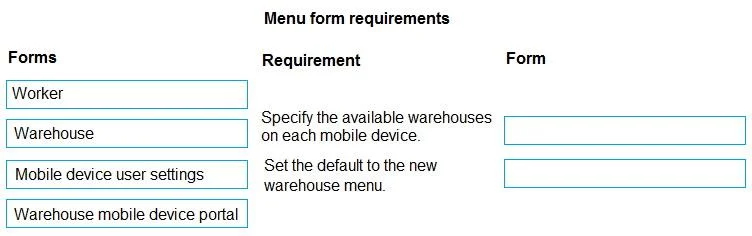
Answer Area
Drag items
Correct arrangement
- Warehouse
- Worker
Explanation
Dynamics 365 SCM: Warehouse Mobile Device Menu Configuration
The Two Requirements and Their Answers
Requirement 1: Configure a reduced set of mobile device operations for the new e-commerce warehouse → Warehouse
In D365 SCM, you first build a mobile device menu (with only the needed operations), then you assign that menu to a warehouse via the Warehouse form (Warehouse Management > Setup > Warehouse > Warehouses). The menu assignment lives at the warehouse level, so every worker logging into that warehouse sees only the operations configured for it. This is the correct place to define what a warehouse offers on mobile devices - not the individual worker record.
Requirement 2: Set the default warehouse menu for workers who split time between locations → Worker
The Worker form (Warehouse Management > Setup > Worker) lets you configure a default warehouse per individual worker. When a primary distribution center worker logs into the mobile device app, D365 will default them to whichever warehouse is set on their Worker record - in this case, the new e-commerce warehouse. This handles the per-person default without affecting other workers or the warehouse setup globally.
Why Not the Other Options?
| Option | Why It's Wrong |
|---|---|
| Mobile device user settings | Controls display/UX preferences (e.g., font size, vibration) for the app, not warehouse assignment or menu defaults. Common wrong pick for requirement 2. |
| Warehouse mobile device portal | This is the mobile app/interface itself - not a configuration form. Nothing is "set up" here. |
Key Misconception to Avoid
Many candidates confuse Mobile device user settings with the Worker form for requirement 2. The critical distinction: user settings control how the app looks/behaves, while the Worker record controls which warehouse a worker defaults to. The question explicitly says workers need to default to the new warehouse menu on login - that's a Worker-level configuration.
Topics
Community Discussion
No community discussion yet for this question.