
MB-330 · Question #459
Drag and Drop Question A company is configuring the handheld warehouse mobile device in Dynamics 365 Supply Chain Management. Several warehouse activities are documented as required configurations…
The correct answer is Indirect; Indirect; Indirect; Work. Dynamics 365 SCM: Warehouse Mobile Device Menu Item Modes Note: Your question is missing the actual activity labels for positions 1–4. The correct answers are given (Indirect, Indirect, Indirect, Work), but without the activity names I can't address each placement individually…
Question
Exhibit
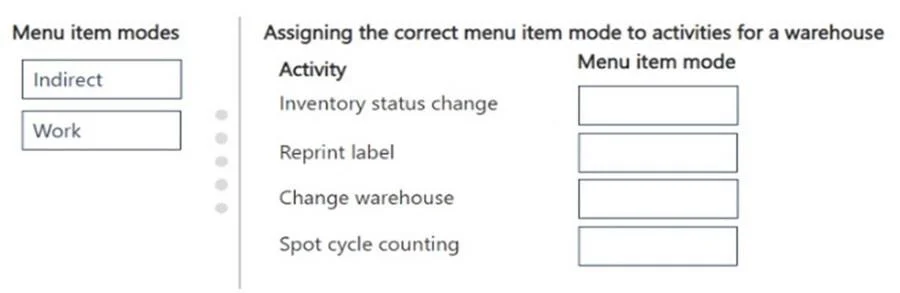
Answer Area
Drag items
Correct arrangement
- Indirect
- Indirect
- Indirect
- Work
Explanation
Dynamics 365 SCM: Warehouse Mobile Device Menu Item Modes
Note: Your question is missing the actual activity labels for positions 1–4. The correct answers are given (Indirect, Indirect, Indirect, Work), but without the activity names I can't address each placement individually. Here is the full conceptual framework so you can apply it to any version of this question.
Core Concept: Indirect vs. Work
| Mode | What it does | Tied to a Work Order? |
|---|---|---|
| Indirect | Performs an activity not driven by a system-created work order | No |
| Work | Processes existing warehouse work orders created by the system | Yes |
When to Use Each Mode
Indirect
Use for activities where the worker initiates the action themselves, not in response to a system-generated work task. Examples:
- Cycle counting (ad-hoc)
- Inventory adjustment (in/out)
- Moving inventory without a work order
- Reporting production as finished
- Viewing open work lists (inquiry)
- Cluster picking setup
Work
Use when the system has already created a work record and the worker is executing against it. Examples:
- Purchase order receiving (directed put-away)
- Sales order picking
- Transfer order picking/receiving
- Replenishment
Applying This to the Answer (1=Indirect, 2=Indirect, 3=Indirect, 4=Work)
The pattern tells you that three activities are worker/admin-initiated (no pre-existing work order) and one activity processes system-generated work. Typically in exam scenarios this maps to:
- Activities like "display open work," "cycle count," or "inventory adjustment" → Indirect
- An activity like "purchase receiving" or "sales picking" → Work
Common Misconceptions
- "Cycle count always uses Work mode" - False. Standard cycle counting uses Indirect unless it is guided directed cycle counting tied to a work order.
- "Receiving must be Indirect since workers initiate it" - False. Receiving in a WMS-enabled warehouse generates a work order for put-away, making it Work mode.
- "You can only use each mode once" - The question explicitly states modes can be reused, which is why three items share Indirect.
If you can share the four activity names, I can give you a precise per-item explanation.
Topics
Community Discussion
No community discussion yet for this question.