
MB-330 · Question #159
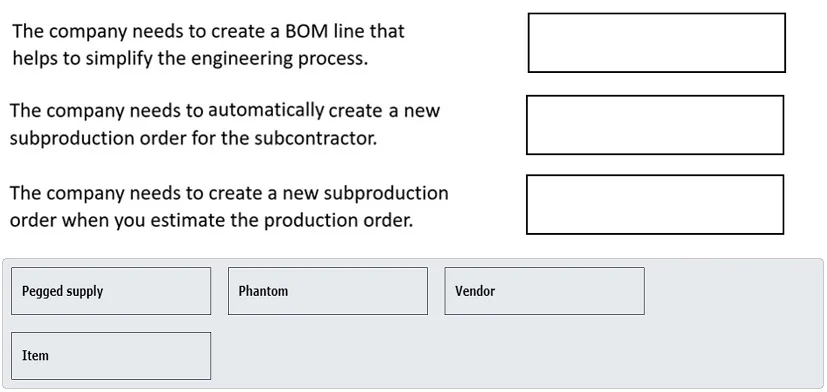
Drag and Drop Question You are the administrator for Dynamics 365 Supply Chain Management for a company named Companyl You need to set up some bill of materials (BOM) line types to define the…
The correct answer is Phantom; Vendor; Pegged supply. BOM Line Types in D365 Supply Chain Management Overview of All Available Types | Type | Purpose | |------|---------| | Item | Standard stocked component planned via MRP | | Phantom | Non-stocked subassembly - exploded through; its sub-components are consumed directly | | Vendor…
Question
Exhibit
Answer Area
Drag items
Correct arrangement
- Phantom
- Vendor
- Pegged supply
Explanation
BOM Line Types in D365 Supply Chain Management
Overview of All Available Types
| Type | Purpose |
|---|---|
| Item | Standard stocked component planned via MRP |
| Phantom | Non-stocked subassembly - exploded through; its sub-components are consumed directly |
| Vendor | Component supplied by an outside vendor (subcontracting/outside processing) |
| Pegged supply | Supply dedicated/linked directly to one specific demand, bypassing normal MRP netting |
Correct Arrangement Explained
Position 1 → Phantom
Used when the BOM line represents a subassembly that is not kept in inventory and should not generate its own production order. Instead, planning "explodes" through it and consumes its child components directly in the parent production order. This is ideal for virtual or packaging subassemblies and is the correct choice when a scenario describes a component that shouldn't be stocked but whose parts should flow up to the parent.
Common mistake: Confusing Phantom with Item. Items ARE stocked and planned independently through MRP. Phantoms are transparent to planning.
Position 2 → Vendor
Used when the component or operation is performed or supplied by an external vendor (subcontracting scenario). The system generates a purchase order rather than a production order for this line. This signals outside processing - the material or service comes from outside the company.
Common mistake: Using "Item" for vendor-supplied components. Item type still triggers internal MRP planning; Vendor type routes it to a purchase order.
Position 3 → Pegged supply
Used when a component's supply must be exclusively reserved and linked to one specific production order demand, bypassing the normal MRP netting pool. Unlike standard planning, pegged supply does not get netted against other demand - it creates dedicated, earmarked supply for that exact order.
Common mistake: Thinking Pegged supply is just another name for a reserved Item. The key distinction is that it skips MRP netting entirely - supply is hard-linked to that demand.
Why "Item" Is Not Used
The Item type is the default for standard stocked components and is fully planned through MRP. None of the three scenarios in this question describe that pattern - they each require specialized behavior (explosion, external sourcing, or demand pegging), which is why Item appears in the available list but is not placed in any scenario.
Topics
Community Discussion
No community discussion yet for this question.