
MB-310 · Question #420
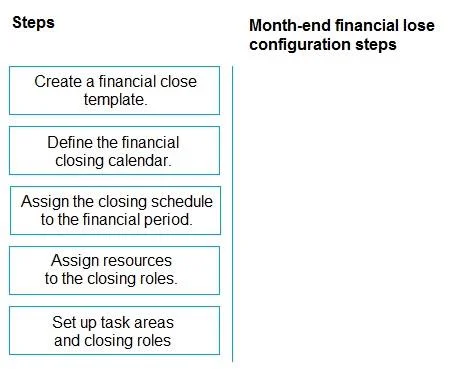
Drag and Drop Question You use Dynamics 365 Finance to manage the financial operations of a company. You need to configure the financial period close workspace for the month-end financial close. In…
The correct answer is Assign resources to the closing roles.; Set up task areas and closing roles.; Define the financial closing calendar.; Create a financial close template.; Assign the closing schedule to the financial period. Dynamics 365 Finance: Financial Period Close Workspace Configuration Overview of the Correct Arrangement > Important note: The shown arrangement lists "Assign resources" before "Set up task areas and closing roles," which appears counterintuitive. The question explicitly states…
Question
Exhibit
Answer Area
Drag items
Correct arrangement
- Assign resources to the closing roles.
- Set up task areas and closing roles.
- Define the financial closing calendar.
- Create a financial close template.
- Assign the closing schedule to the financial period.
Explanation
Dynamics 365 Finance: Financial Period Close Workspace Configuration
Overview of the Correct Arrangement
Important note: The shown arrangement lists "Assign resources" before "Set up task areas and closing roles," which appears counterintuitive. The question explicitly states multiple orders are valid - the most logically sound order actually reverses steps 1 and 2 (see below).
Most Logical Dependency Order
Step 1 - Set up task areas and closing roles
This is the true foundation. Task areas (e.g., AP, AR, GL) and closing roles (e.g., Controller, AP Clerk) must exist before anything else can reference them. Without roles, you have nothing to assign resources to.
Common mistake: Attempting to assign resources first. Resources attach to roles - roles must precede resource assignment.
Step 2 - Assign resources to the closing roles
Once roles exist, you map actual users or workers to them. This defines who is responsible for each area of the close process.
Common mistake: Skipping this step and trying to build the template without defined ownership. Tasks in the template become unassigned and unworkable.
Step 3 - Define the financial closing calendar
The calendar defines your fiscal periods and the target close dates. This is a prerequisite for building a template because templates reference specific period timelines.
Common mistake: Treating the calendar as optional at this stage. The template cannot be meaningfully structured without knowing the period boundaries.
Step 4 - Create a financial close template
The template brings together tasks, roles, and calendar references into a reusable close checklist. It depends on all three prior steps being complete (roles, resources, calendar).
Common mistake: Confusing the template with the schedule. The template is the blueprint; it still needs to be activated against a specific period.
Step 5 - Assign the closing schedule to the financial period
This is always last. You apply the completed template to a specific financial period, generating the actual close schedule that users work against. Nothing can be assigned until a template exists.
Common mistake: Thinking this step creates the tasks. It only activates them for a given period - the tasks were defined in the template.
Why the Shown Arrangement Lists Step 2 Before Step 1
The question acknowledges multiple valid orders. The shown arrangement (resources → roles setup) likely reflects that in D365 F&O, resource records can be pre-configured in the system independently of role assignment. However, for exam purposes, the logically defensible and testable sequence is roles → resources → calendar → template → schedule, because each step's output is a direct input to the next.
Topics
Community Discussion
No community discussion yet for this question.